
 Community
 Video Library
 Agent Training
 Freshservice
 Freshdesk
 Freshchat
 Freshcaller
 Freshsales
 Freshteam
 Freshworks Neo
 Freshsurvey
 Freshservice for MSP
 Note: Available only for new signups after the 31 March, 2026 release. If you signed up earlier, refer to the existing ITAM documentation.
Certificate autodiscovery jobs scan specified network assets to identify SSL certificates and import their details. If a certificate is discovered on an IP address already associated with a device in the system, it is automatically linked to that device. For more information on managing certificates after they are discovered, see the Certificates management page.
Add SSL certificate discovery job
To create a new certificate autodiscovery job, follow these steps:
Go to Admin > Asset Management > Scan and discover > click the Discovery Jobs tab.
Select SSL Certificate from the list of discovery jobs and click Add new.
Enter a relevant name for the discovery job.
Enter the target IP address or range of IP addresses.
Specify the ports to be scanned.
To identify supported encryption methods, enable Find cipher suites supported by the server.
Note: Discovering cipher suites can significantly slow down the discovery process. If you encounter performance issues or wish to speed up regularly scheduled jobs, disable this toggle.Scroll down to the Discovery Schedule section and click + Add new to set the run times and days.
Click Save.
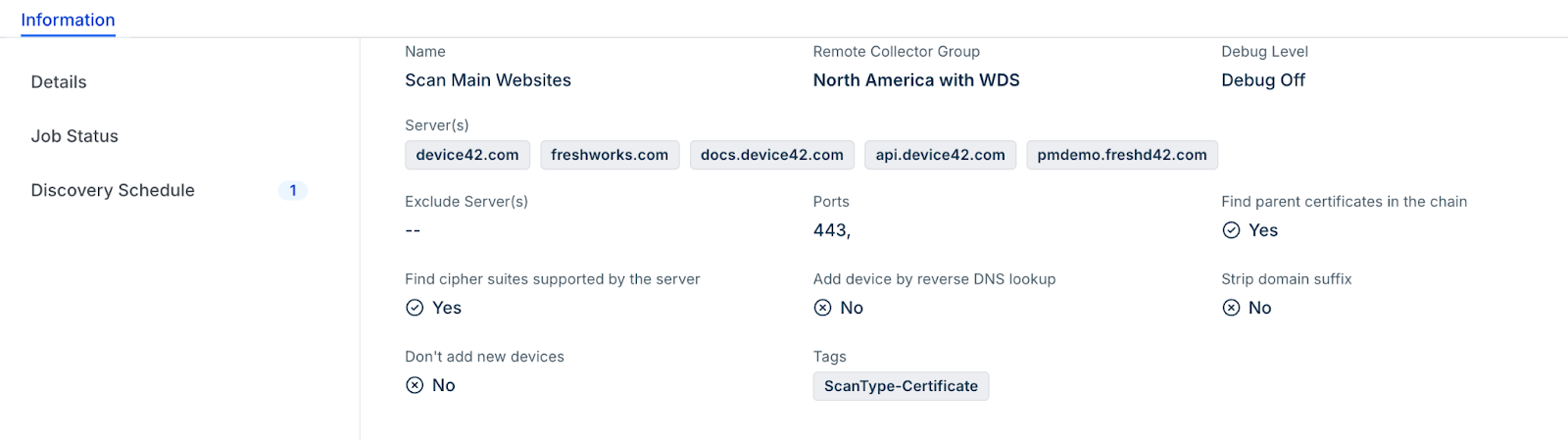
Note: Newly created jobs do not run on the day they are created. This prevents an unintentionally large number of jobs from running simultaneously during initial setup. To run a job immediately after creation, click Run Now on the job details page or the
After the scan completes, go to Applications > Certificates to inspect the discovered data.
Multitenancy considerations
Certificate discovery can fail if multitenancy is enabled and the discovery job targets a VRF group whose subnet does not exist in the system. If you encounter this behavior, perform one of the following actions:
Create the target subnet manually in the system.
Run a network discovery first to populate the necessary subnets, as recommended in autodiscovery best practices.