
 Community
 Video Library
 Agent Training
 Freshservice
 Freshdesk
 Freshchat
 Freshcaller
 Freshsales
 Freshteam
 Freshworks Neo
 Freshsurvey
 Freshservice for MSP
 Note: This feature works the same across all Freshservice products. Some screenshots or articles may reflect older designs, but the functionality remains unchanged. If certain options do not appear in your account, they may not be included in your current plan.TABLE OF CONTENTS
- Introduction to Freshdesk-Freshservice/FSBT integration
- Benefits of this integration
- Which agent can access this integration?
- Freshservice/FSBT admin experience and configuration for integration
- How can admins set up visibility of a Freshservice/FSBT ticket for Freshdesk agents?
- How Freshservice/FSBT admin can improve agent productivity and prioritize customer issues for faster resolution
- Custom SLA: Freshservice/FSBT admins can configure a custom SLA for service requests/incidents of tickets generated from Freshdesk to ensure quick resolution.
- How does this integration help internal teams on Freshservice?
- Internal operations flow for Freshservice agents
- What information about Freshdesk tickets can the Freshservice agents view?
Introduction to Freshdesk-Freshservice/FSBT integration
Freshservice/FSBT and Freshdesk integration help internal support teams on Freshservice/FSBT collaborate with customer support teams on Freshdesk to get a 360 view of customer issues for faster resolution. This integration enables companies to streamline and accelerate the service management process and deliver outstanding support from a unified window.
Benefits of this integration
This integration enables support teams to effortlessly collaborate with your internal teams on Freshservice/FSBT on codependent tickets. With seamless collaboration and real-time ticket updates, your internal agents can stay on top of any query that comes their way and help resolve customer issues faster.
With the Freshdesk-Freshservice/FSBT integration, your teams will be able to:
Reduce the average resolution time of internal teams on Freshservice/FSBT by enabling them with the full context of the customer issue right from Freshservice/FSBT
Increase agent productivity & reduce the scope for error with Workflow Automator & information-sharing processes.
Ease of tracking the internal agent performance on Freshservice/FSBT for tickets & service requests created from Freshdesk to Freshservice/FSBT.
Which agent can access this integration?
Agents and admins on both Freshdesk and Freshservice/FSBT can access this integration as per defined visibility. But only the Freshdesk and Freshservice/FSBT Admins will be able to initiate and set up this integration.

Freshservice/FSBT admin experience and configuration for integration
How can admins set up visibility of a Freshservice/FSBT ticket for Freshdesk agents?
Freshdesk Admin can choose between the following:
All conversations on the Freshservice/FSBT ticket (replies, public notes, private notes).
Only public conversations on the Freshservice/FSBT ticket (replies, public notes).
How Freshservice/FSBT admin can improve agent productivity and prioritize customer issues for faster resolution
Custom SLA: Freshservice/FSBT admins can configure a custom SLA for service requests/incidents of tickets generated from Freshdesk to ensure quick resolution.
Step 1: Go to the Freshservice/FSBT Admin page> SLA Policies> Create a new SLA policy.
Step 2: Define response time, resolution time, Operational hours
Step 3: Select source as Freshdesk to enforce SLA on tickets incoming from Freshdesk

Custom Reports: Admin can keep a tab on essential metrics to analyze the performance of the Freshservice agents on service requests and incidents generated from Freshdesk as the source.
Step 1: Go to Freshservice Analytics & Reports
Step 2: Create a new report or clone and edit an existing report with desired metrics (example, agent performance)
Step 3: Click filter and add source as Freshdesk.
Step 4: Apply the filter and save this report.


Learn more about Custom reports and Analytics on Freshservice/FSBT
Workflow Automation: To improve agent productivity, the Freshservice admin can automate the workflow to standardize the process for customer issues raised from Freshdesk.
Step 1: Go to Freshservice/FSBT admin> Workflow Automator.
Step 2: Select tickets from the new Automator on the top right corner of the page
Step 3: Drag and drop the event and select “ticket is raised”
Step 4: Now drag and drop the condition and select source as Freshdesk. Add other conditions as per requirement.
Step 5: Now add an action such as “assign to a specific agent or group”.
Step 6: Save and activate.

Learn more about Workflow Automator
Learn how to set up the configuration and agent experience
How does this integration help internal teams on Freshservice/FSBT?
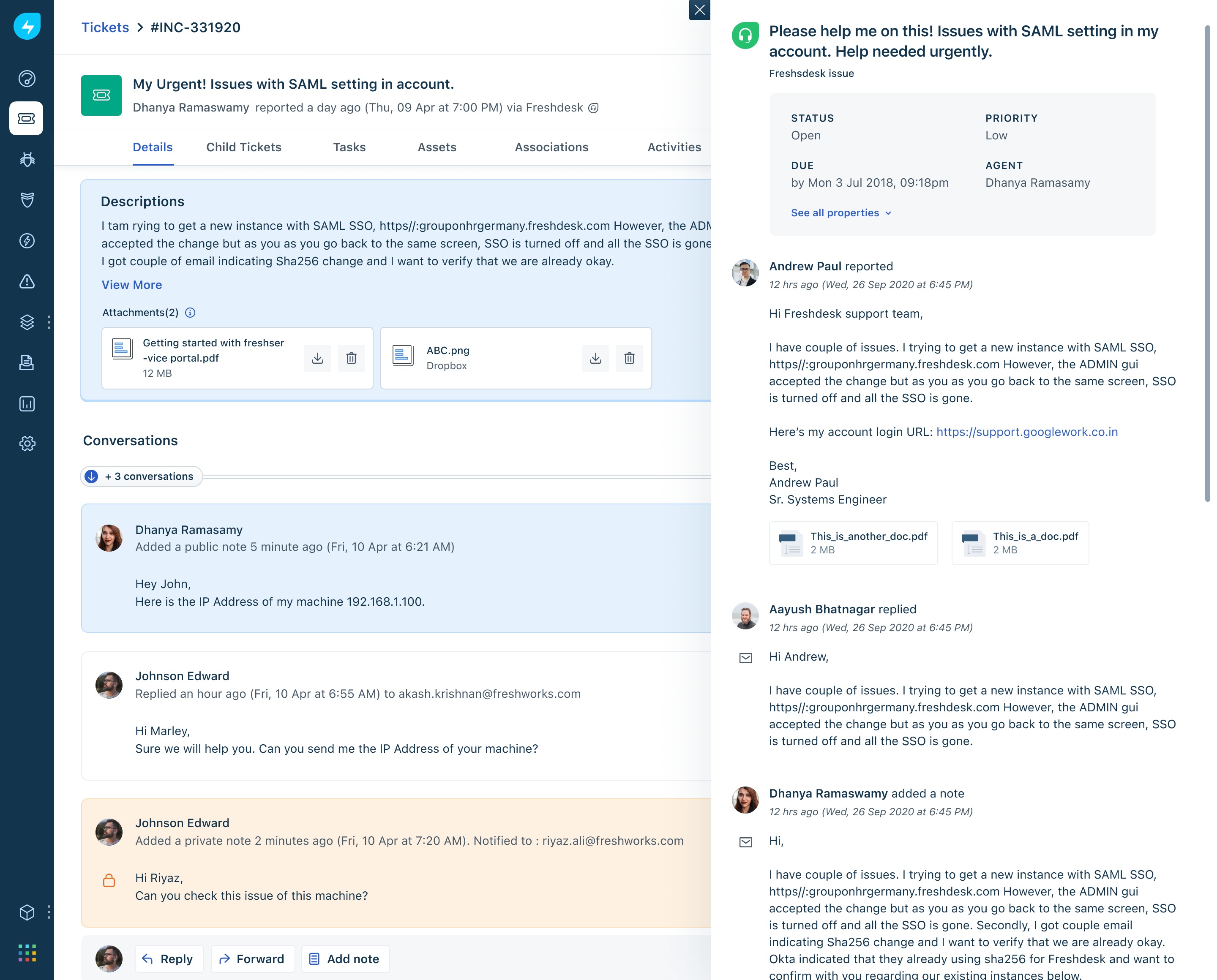
Internal agents will view customer replies, status updates, and default properties of the actual Freshdesk ticket.
Workflow automation can run on Freshservice/FSBT tickets created from Freshdesk, reducing manual work for internal team supervisors, and thereby saving time.
Access to custom SLAs & reporting in Freshservice/FSBT with a specific source for tickets coming in Freshdesk to analyze metrics and improve performance.
Internal operations flow for Freshservice/FSBT agents
Freshservice/FSBT agents can view Freshdesk ticket properties (default, public) & customer interactions on the Freshdesk ticket.
They will also get real-time notifications when a ticket’s ticket’s new response or status update is made (ticket fields sync).
Freshservice/FSBT agent will be able to distinguish and filter tickets based on source (as Freshdesk)
Freshservice/FSBT agents will be able to collaborate with external agents via replies, public notes,s or even private notes (if sync allows)
What information about Freshdesk tickets can the Freshservice/FSBT agents view?
Freshdesk Admins can restrict information passed down to Freshservice/FSBT agents:
All conversations on the Freshdesk ticket (replies, public notes, private notes)
Only public discussions on the Freshdesk ticket (replies, public notes)
None (only ticket properties)

Learn how to sync fields between FD-FS/FSBT
Also, check out how to create incidents and service requests from Freshdesk to Freshservice/FSBT.