
 Community
 Video Library
 Agent Training
 Freshservice
 Freshdesk
 Freshchat
 Freshcaller
 Freshsales
 Freshteam
 Freshworks Neo
 Freshsurvey
 Freshservice for MSP
 The Email AI Agent uses generative AI to automatically respond to employee queries received through email. By analyzing your knowledge base and service catalog, it identifies user intent and generates concise, contextual responses with references to relevant knowledge sources. The Email AI Agent supports workspace-level configuration, allowing you to customize knowledge sources, handover rules, and deployment settings for different departments such as HR and IT.
This article provides details about the capabilities of the Email AI Agent and the steps to configure knowledge scoping, handover settings, and deployment options.
TABLE OF CONTENTS
Prerequisites
Verify the following requirements before setting up the Email AI Agent:
You have administrator privileges for Agent Studio and account settings.
Required languages are enabled in your account settings and across portals.
Email AI Agent overview
The Email AI Agent empowers support teams to automatically respond to incoming emails using context-aware, article-based answers. A single Email AI Agent can be configured and deployed across multiple workspaces while applying workspace-specific knowledge sources, handover rules, and routing logic.
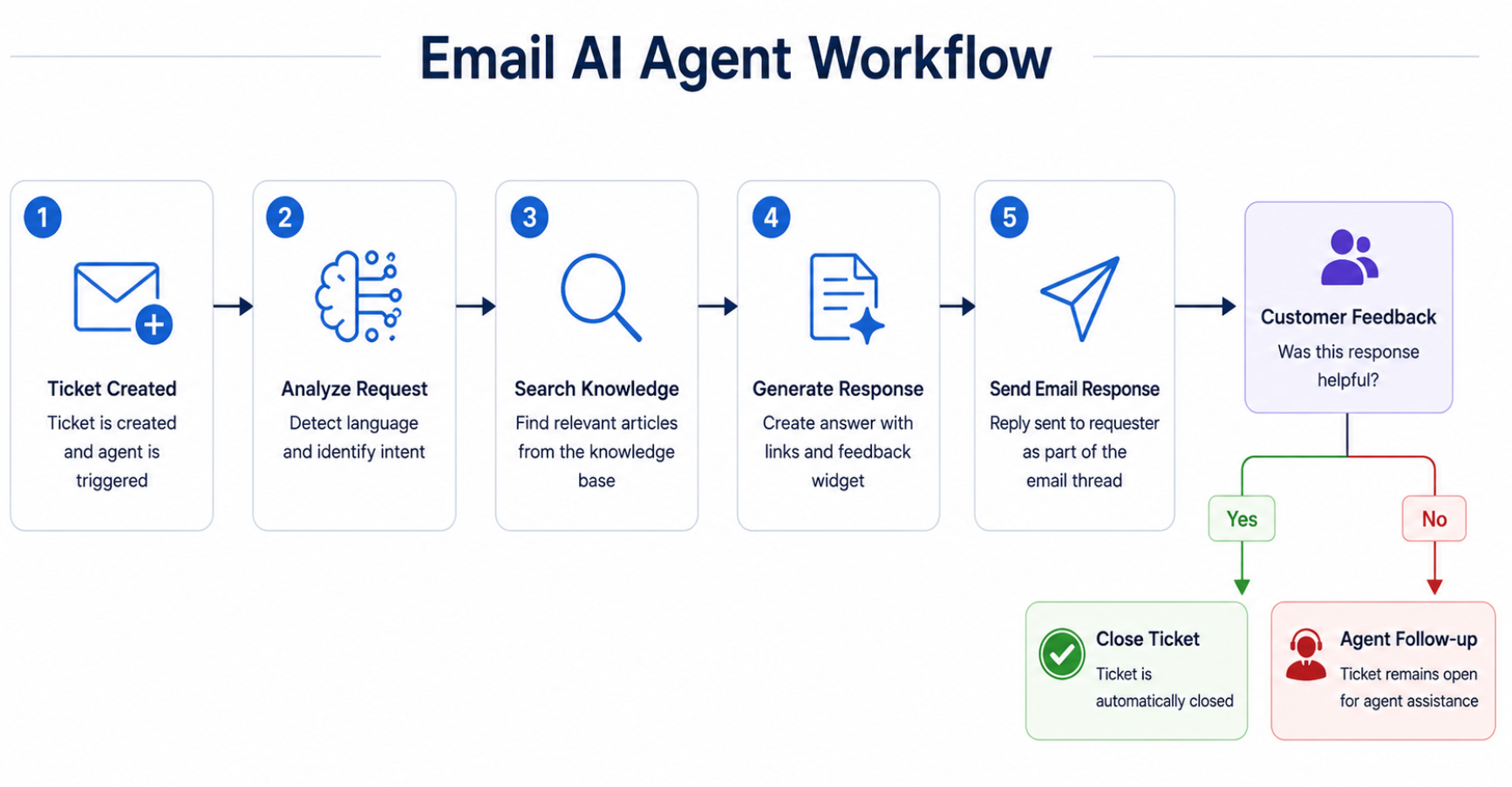
The Email AI Agent automatically responds to newly created tickets by email. The Email AI Agent can:
Identify the requester's intent.
Search the configured solution article, URL, files, content in apps such as, Google drive, Confluence, and and Sharepoint
Generate a concise response as a source with links to relevant knowledge sources.
Include an in-email feedback widget.
Automatically close the ticket when the requester confirms that the issue is resolved.
Email AI Agent workflow
The Email AI Agent processes email-based support requests through a series of stages, from ticket creation to resolution. The following workflow summarizes the process.
Related tasks
To create and configure AI Agents, see the following articles: