
 Community
 Video Library
 Agent Training
 Freshservice
 Freshdesk
 Freshchat
 Freshcaller
 Freshsales
 Freshteam
 Freshworks Neo
 Freshsurvey
 Freshservice for MSP
 TABLE OF CONTENTS
- Overview
- Email delivery failed
- SLA violations (First response and Resolution)
- OLA violations
- System monitoring and logs
- Summary of module applicability
Overview
Automate your service desk operations by leveraging system-driven events. These triggers allow administrators to execute specific workflows when email deliveries fail, or when service level agreement (SLA) or operational level agreement (OLA) thresholds are breached.
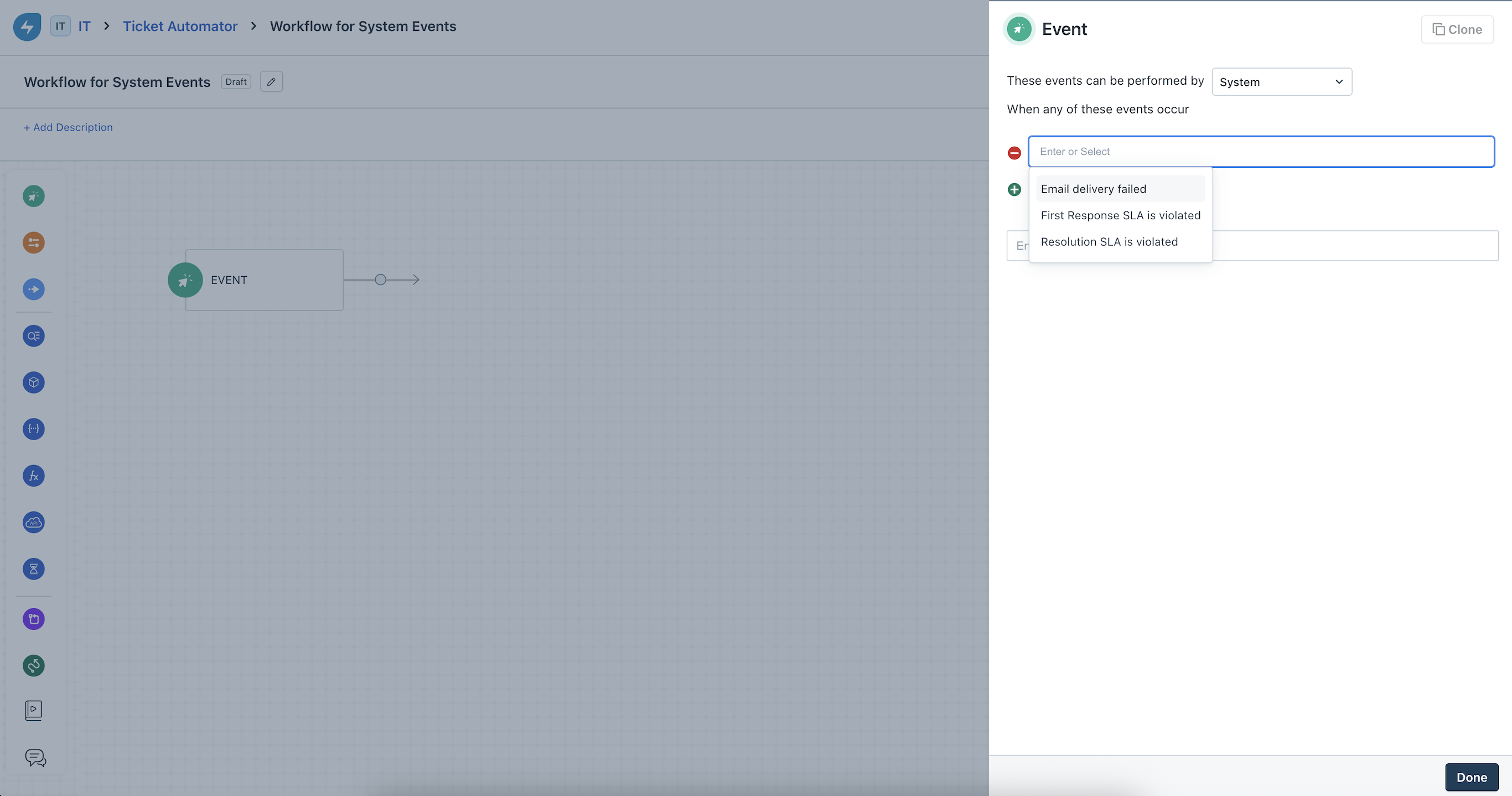
Email delivery failed
This event triggers when an email sent from Freshservice fails to reach its recipient due to SMTP errors or invalid addresses.
Applicability: Ticket module only (includes parent tickets in Task workflows).
Trigger source: Occurs when actions are performed on the ticket details or creation pages (for example, Reply or Forward).
Execution: If a single email has multiple recipients, the workflow triggers only once per failure event.
Benefits
Immediate alerts: Automatically notify agents or supervisors via alternative channels when critical communication fails.
Audit visibility: Track every execution through the Activity Log and configuration changes in the Audit Log.
Limitations
Does not apply to non-ticket modules (Changes or Problems).
Does not trigger for emails categorized as spam or rejected downstream after a successful SMTP handshake.
Placement restriction: Should not be used as a secondary event in multi-event workflows, as the workflow will stall until a failure occurs.
SLA violations (First response and Resolution)
Automate escalations when tickets, changes, or problems exceed their defined time limits. Unlike supervisor rules that run hourly, these triggers execute within a 15-minute window of the breach.
First response SLA violated
Module: Tickets.
Condition: Triggers the first time a response breach is detected, including cases involving priority changes or manual SLA re-configurations.
Scope: Applies to tickets updated within the last two months, including those already in a Resolved or Closed state.
Resolution SLA violated
Modules: Ticket, Change, and Problem.
Condition: Triggers when a record is not resolved within the period defined by its priority or policy.
Benefits
High frequency: Responds to breaches much faster than standard supervisor rules.
Precision: Supports custom business calendars and time zones.
Resilience: Triggers even if an agent "corrects" the violation (for example, responds) during the 15-minute processing window.
Limitations
First response constraint: This must be the primary (first) event in the workflow.
Redundancy: If supervisor rules and workflow triggers overlap, both will execute; ensure logic is configured to prevent duplicate notifications.
OLA violations
This event ensures internal team accountability by triggering workflows when a task exceeds its internal deadline.
Applicability: Task module exclusively.
Hierarchy: Triggers for tasks associated with Tickets, Changes, Problems, or Releases.
Execution: A workflow triggers independently for every task that breaches its OLA.
Benefits
Granular control: Manage internal team performance at the task level rather than just the ticket level.
Dynamic support: Handles simultaneous violations across multiple tasks and parent records effectively.
System monitoring and logs
To ensure transparency, all system event configurations and executions are recorded as follows.
Audit log (Admin configuration)
Captures when an administrator adds or modifies these events.
Format: [Admin Name] added event [Event Name]; Set "These events can be performed by" to System.
Activity log (Workflow execution)
Confirms the successful run of a specific automation.
Format: Workflow [WF Name] executed successfully from [Event Name] event.