
 Community
 Video Library
 Agent Training
 Freshservice
 Freshdesk
 Freshchat
 Freshcaller
 Freshsales
 Freshteam
 Freshworks Neo
 Freshsurvey
 Freshservice for MSP
 Simple Network Management Protocol (SNMP) discovery is a standard method for identifying and managing network-connected hardware. This article provides information on how to create discovery jobs, configure credentials, and manage discovered network devices.
SNMP discovery allows Freshservice to pull detailed inventory data from switches, routers, and access points. It supports SNMP v1, v2c, and v3, including IPv6 device discovery. SNMP is typically used in a read-only capacity, but it can support read and write permissions. SNMP collects management data in the form of variables, which are organized in a Management Information Base (MIB). An MIB describes the variables available on a given system, each of which can be remotely queried through SNMP.
SNMP Discovery items
Network devices can be discovered using SNMP v1, v2c, or v3. If you want to do Storage discovery through SNMP, refer to SNMP SAN/Server Autodiscovery.
Note: SNMP discovery pulls in CDP/LLDP neighbors as long as SNMP credentials are the same across all neighbors. If the credentials are not the same, you can add those devices using separate discovery jobs.
Create an SNMP discovery job
To configure a new network discovery job, follow these steps:
Step 1: Add a new discovery job
Go to Admin > Asset Management > Scan and discover and click the Discovery Jobs tab.
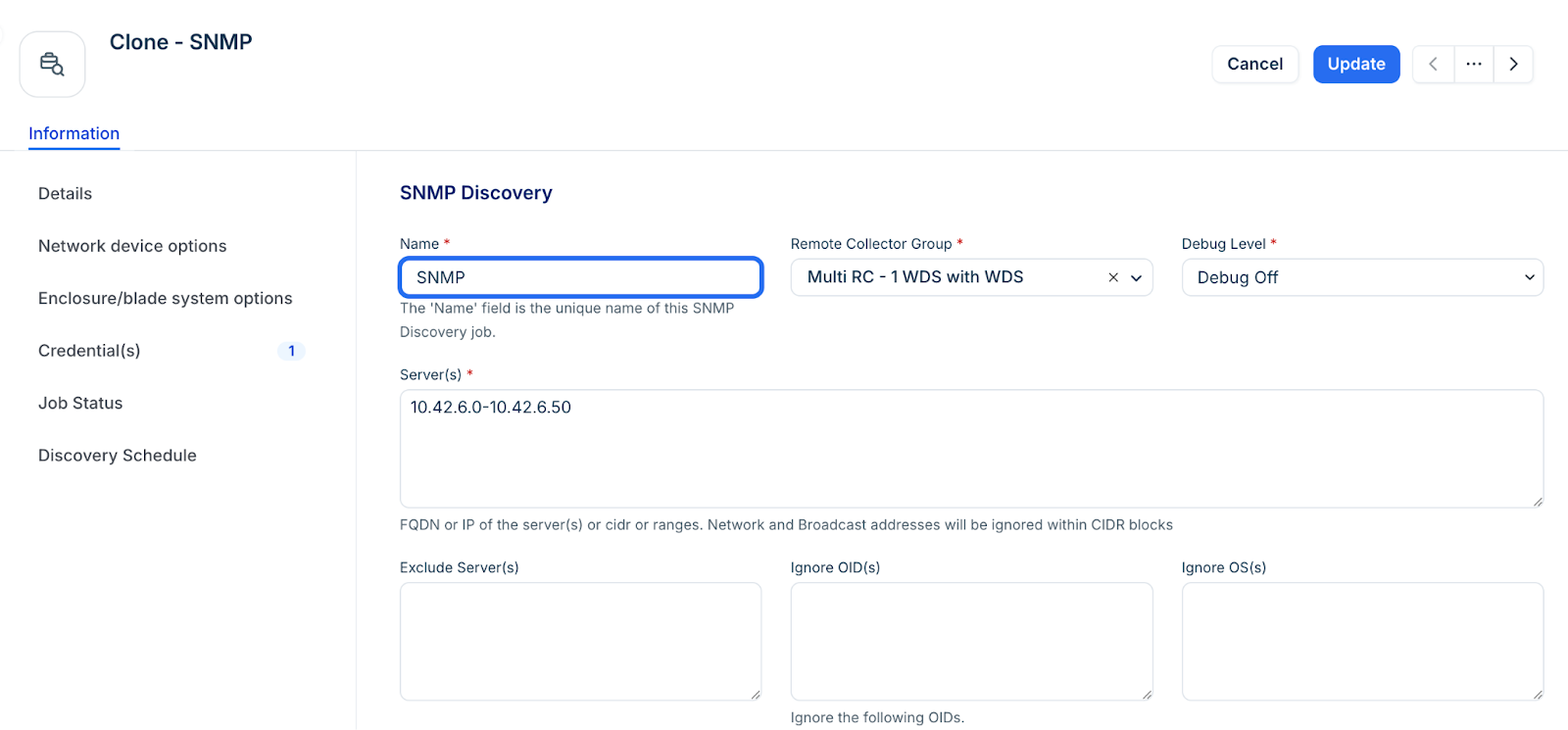
Select SNMP from the list of discovery jobs and click Add new.
Fill in the following job details:
Server(s): Enter FQDNs, IP addresses, or CIDR blocks.
Note: CIDR blocks automatically exclude network and broadcast addresses(the first and last IPs in the block). This is expected behavior. As a workaround, you can manually add individual network or broadcast addresses as targets in the SNMP job.
Port: Default is 161.
ICMP/TCP Port Check: Enable this to improve scan efficiency.
Step 2: Exclude OIDs
Enter OIDs to the Ignore OID(s) field so that those will be ignored to prevent them from being collected during SNMP discovery. Use two methods of exclusion:
A trailing dot (.) to ignore entire categories of data.
Omit it to ignore specific OIDs.
For example, 1.3.6.1.2.1.4.35.1 # ignore this OID
For an exact OID match, include the full OID without a dot at the end. For documentation purposes, you can optionally include a comment in text notation on the same line as the OID(s).
To exclude an OID category, include a period (.) at the end of the OID. For example:1.3.6.1.2.1.4.35.1. # ignore entire OID tree
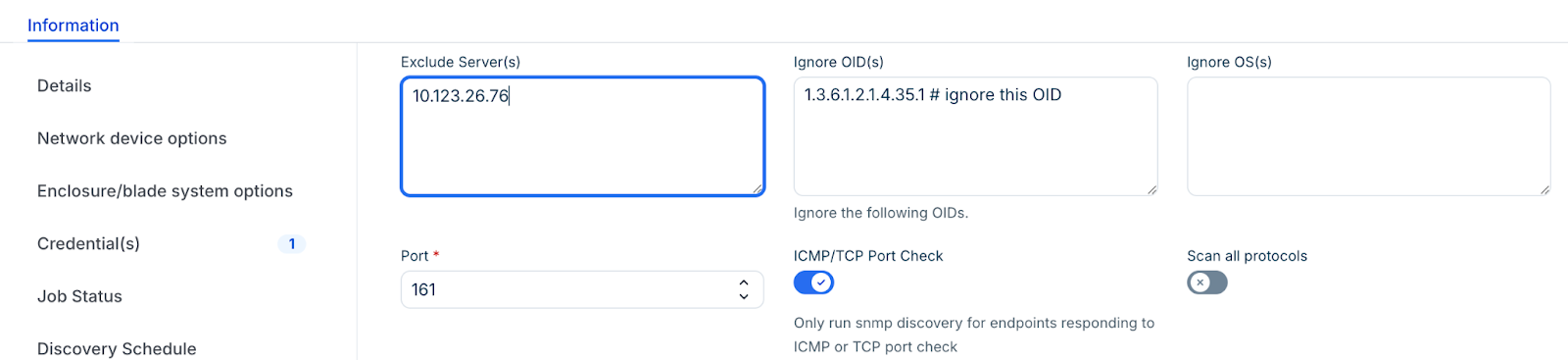
This ignores 1.3.6.1.2.1.4.35.1.2, 1.3.6.1.2.1.4.35.1.3, and all other OIDs that start with 1.3.6.1.2.1.4.35.1.
Note: When OIDs are set to be ignored globally, existing discovery jobs do not automatically inherit these ignored OIDs. To apply the ignored OIDs to existing discovery jobs, create a new discovery job.
Step 3: Configure credentials
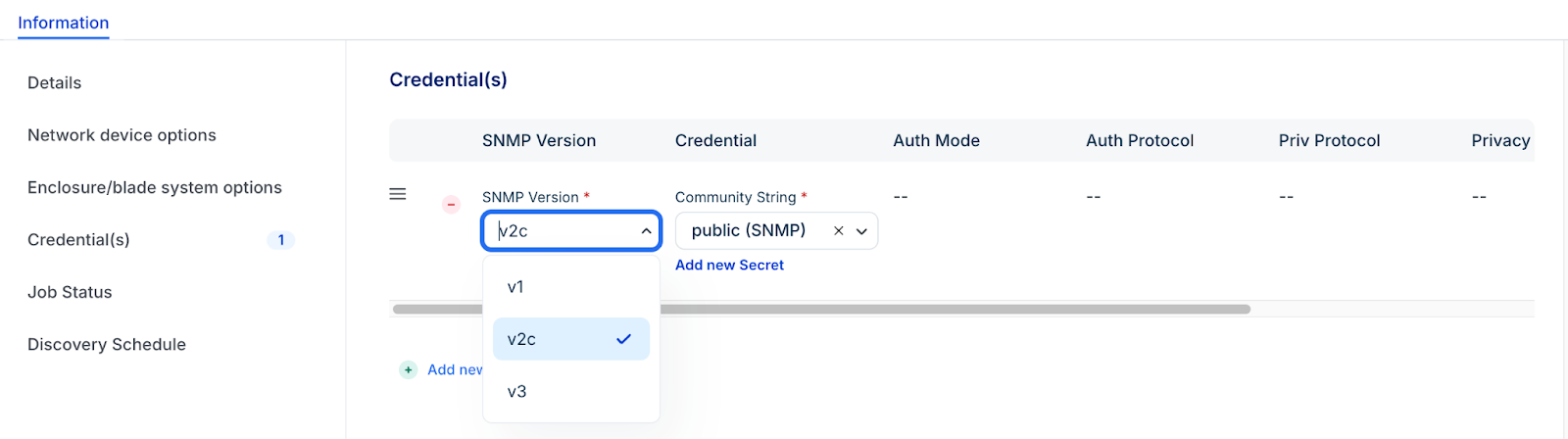
Click + Add new to enter credentials.
Select one of v1, v2c, or v3 SNMP Version. The job uses credentials in the order entered, stopping at the first successful authentication.Subsequent job runs use the last successful credential and then the remaining credentials in the ordered list.
For SNMP v3, specify your Auth Protocols (MD5, SHA, etc.) and Privacy Protocols (DES, AES, etc.). Use only one set of v3 credentials per username to avoid conflicts.
Note: For successful SNMP v3 discovery, use only one set of SNMP v3 credentials per username. Entering multiple credentials with shared passwords results in only one of the credential sets being used.
Step 4: Set discovery options
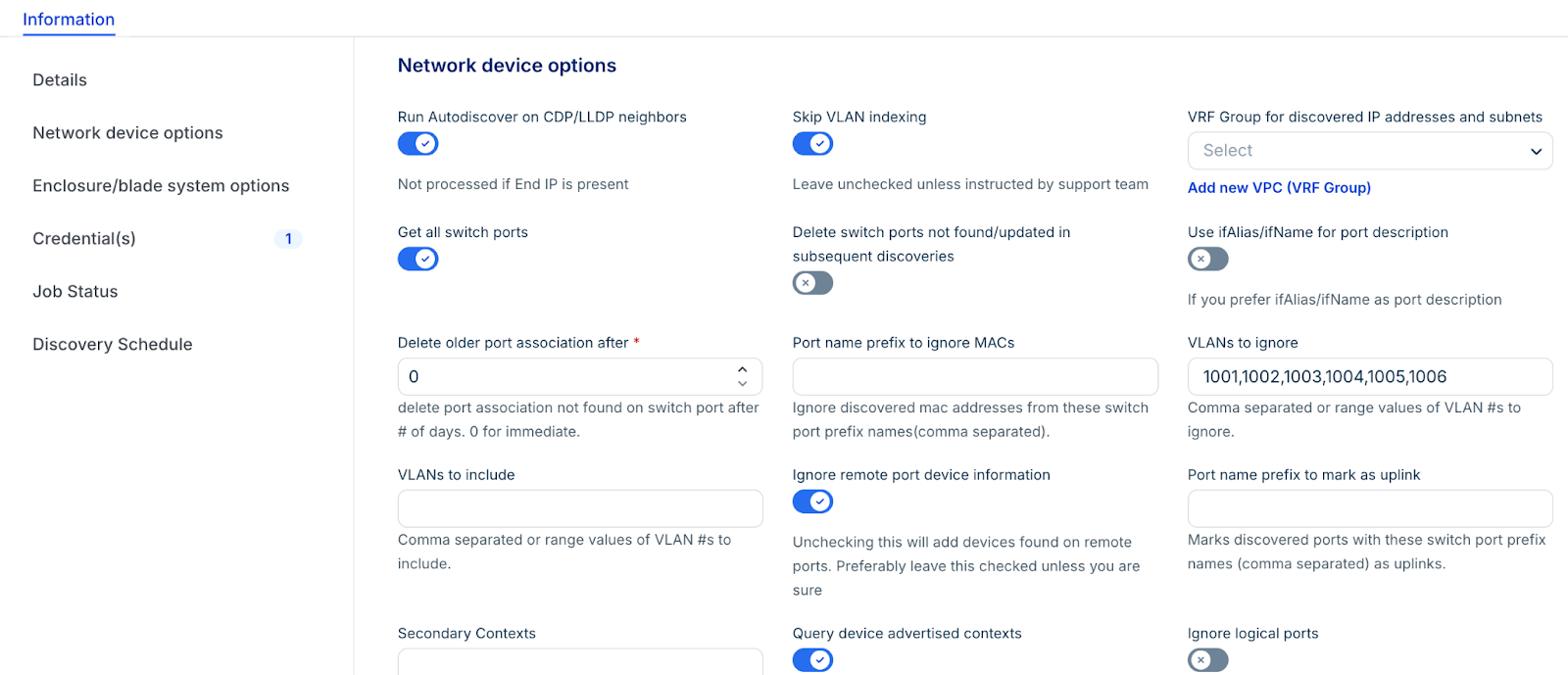
Enable Get all switch ports to view extra options:
Port name prefix to ignore macs: Ignore MAC addresses from ports that start with this prefix.
VLANs to ignore: Do not discover MAC addresses on these VLANs.
Give precedence to hostname: Enable this option to give precedence to the discovered hostname in the network device discovery.
Delete older mac association after: To keep your MAC addresses and switch port connectivity up to date, leave this at 0. This deletes all stale MAC addresses not discovered on the switch port anymore. Otherwise, you can choose the number of days after which to delete the stale MAC association with a switch port.
Discovered port types to ignore: Choose what port types to ignore. For the first time:
Let the job find the port types first.
If you want to ignore specific port types, you must manually delete the corresponding switch ports. You can filter by discovered type under IPAM > Switch Ports.
Add the ports to the ignore list on the discovery page.
Discovered port types not to count: Similar to the above option. This still brings the ports in, but excludes selected port types from the count.
Run Autodiscovery on CDP/LLDP Neighbors: Enable this to find all reachable neighbors with shared credentials.
Delete Switch Ports Not Found: Delete any switch ports that were not found in this discovery.
Step 4: Run or schedule the job
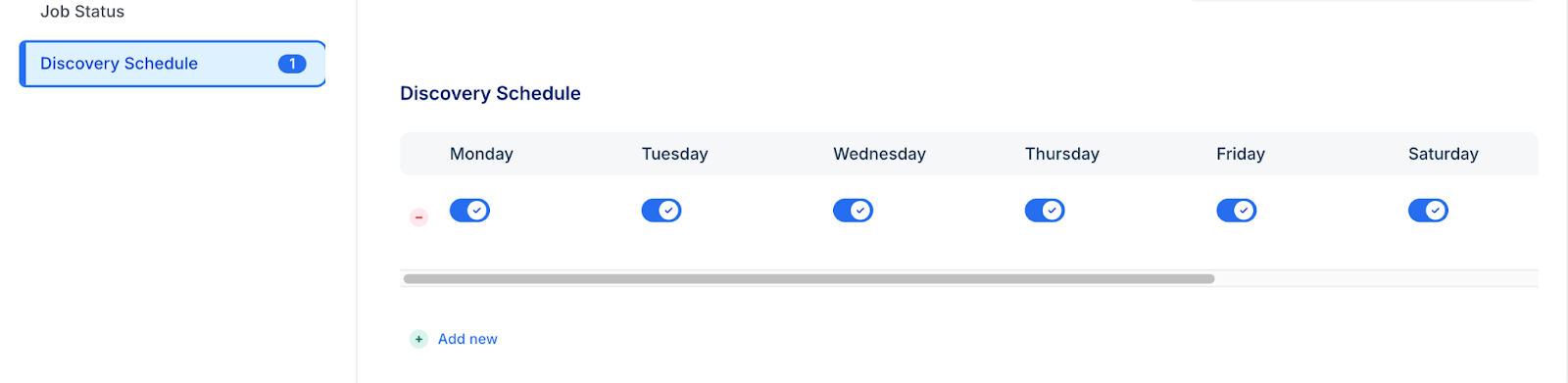
In the Discovery Schedule section, click Add new to set a recurring interval.
Click Save.
To start immediately, click Run Now on the job details page.
Supported protocols
The following SNMP v3 Auth Protocols are supported:
MD5
SHA
SHA256
SHA512
The following SNMP v3 Privacy Protocols are supported:
DES
3DES
AES
AES128
AES192
AES192C
AES256
AES256C
View job status
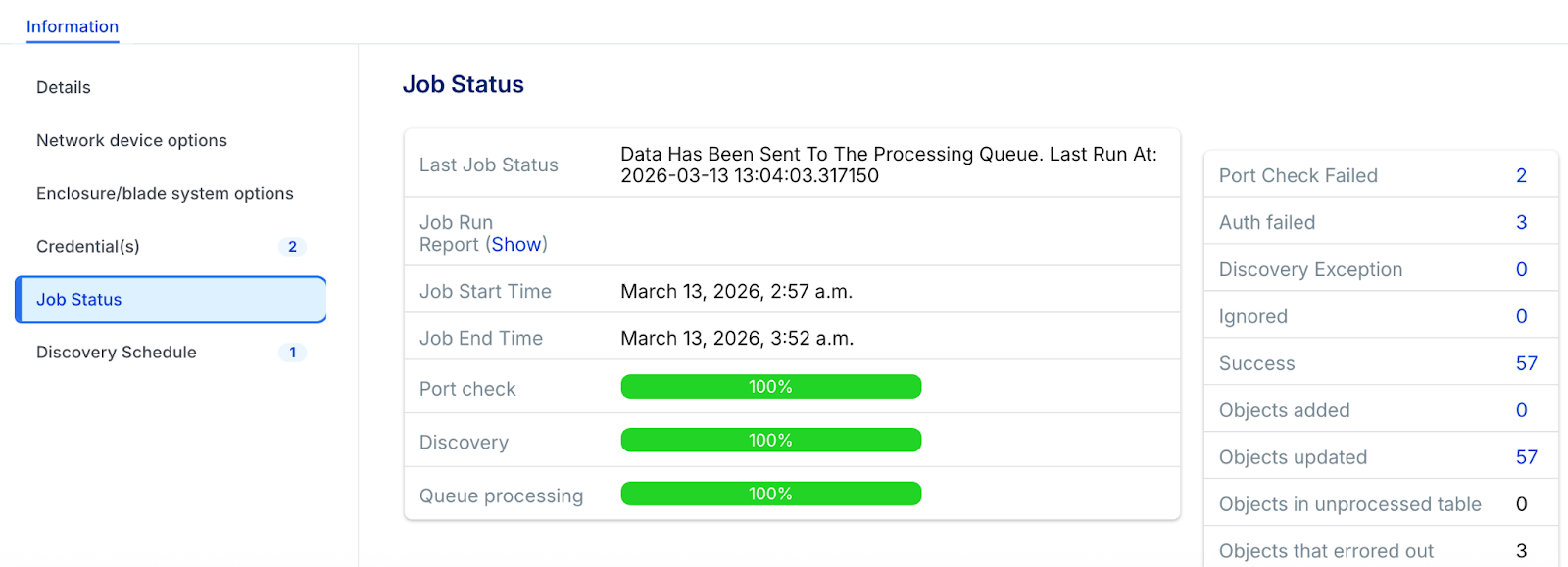
You can view the status and results of a discovery job during or after the job has run in the Job Status section.
Vendor-specific SNMP v3 information
Review these specialized settings for major hardware manufacturers to resolve common authentication and visibility issues
Cisco Nexus 7K switches:
The user for SNMP v3 discovery may need to be in the network-operator or vdc-operator group.
Huawei Switches:
By default, some Huawei devices ship with LLDP (Link Layer Discovery Protocol) via SNMP disabled.
You must switch it on by creating a new mib-view and attaching the ISO tree containing the Huawei LLDP MIB to the community.
Consult the Huawei documentation for complete setup and management details.
Cisco Switches:
Changing from SNMP v1 or v2c to v3 on many Cisco switches can cause SNMP polling of Netdisco to stop functioning, preventing the collection of the per-VLAN MAC tables. You might get an authorization error in the Macsuck log.
To fix this authentication error on Cisco hardware, an additional SNMP-server configuration is required on these switches that enables access to the per-VLAN/per-context MAC address table:
Switches running newer versions of Cisco IOS:
Run this command: snmp-server group v3group v3 auth context vlan- match prefix
Switches with older IOS releases (that don't support "match prefix wildcard"):
Issue the above command for newer IOS releases on EACH VLAN configured for the switch.
Use show snmp context to list configured VLANs.