
 Community
 Video Library
 Agent Training
 Freshservice
 Freshdesk
 Freshchat
 Freshcaller
 Freshsales
 Freshteam
 Freshworks Neo
 Freshsurvey
 Freshservice for MSP
 A multi-agent system uses multiple specialized AI agents to handle requests across different domains. Each agent can be configured with domain-specific knowledge, instructions, workflows, and integrations to resolve requests within its area of expertise.
TABLE OF CONTENTS
- What is a Multi-agent system?
- What is an Orchestrator agent?
- How an Orchestrator Agent works
- Create an Orchestrator agent
- Manage child agents
- Configure access and security
- Use case: Employee onboarding
- Best practices
- Troubleshoot routing issues
What is a Multi-agent system?
A multi-agent system consists of multiple specialized AI agents, also called sub-agents, that work together to handle complex requests. Each sub-agent is responsible for a specific area and can use its own knowledge, instructions, workflows, and integrations.
For example, an organization can configure separate sub-agents for IT, HR, Finance, and Facilities. Each sub-agent can independently handle requests within its domain while contributing to broader, cross-domain processes.
Key capabilities of a multi-agent system
A multi-agent system enables organizations to distribute responsibilities across specialized agents and coordinate them to handle complex requests.
Specialized expertise: Each sub-agent can focus on a specific domain with its own knowledge, workflows, and integrations.
Independent management: Domain teams can configure and maintain their agents independently.
Cross-domain collaboration: Multiple sub-agents can contribute to a single request when it involves different domains.
Scalability: Organizations can add specialized sub-agents as new business requirements emerge.
Context-aware routing: Requests can be directed to the sub-agent with the relevant domain expertise based on the conversation context.
When multiple sub-agents are available, users need a way to interact with them without having to identify which agent can handle each request. An Orchestrator agent provides this coordination layer.
What is an Orchestrator agent?
An Orchestrator agent acts as a central point of contact for multiple specialized sub-agents. It analyzes a user's request, determines the relevant domain, and routes the conversation to the sub-agent best suited to handle it.
The Orchestrator agent manages the routing layer, while each sub-agent remains responsible for resolving requests within its own domain.
For example, an employee can ask about a laptop, leave balance, or office access in the same conversation. The Orchestrator Agent can route each request to the IT, HR, or Facilities sub-agent based on the configured instructions and agent responsibilities.
How an Orchestrator Agent works
The orchestration flow consists of the following components:
User: Starts a conversation through a supported channel.
Orchestrator Agent: Analyzes the user's request and determines the relevant domain.
Child agent: Handles the request using its configured instructions, knowledge sources, workflows, and integrations.
Orchestrator Agent: Continues to route subsequent requests when the user changes topics or requires assistance from another domain.
For example, a user can ask for a laptop and then ask about their leave balance. The Orchestrator Agent can route the first request to the IT agent and the second request to the HR agent without requiring the user to start a new conversation.
Create an Orchestrator agent
Create the Orchestrator agent that will manage routing between the child agents.
Step 1: Create an Orchestrator Agent
In AI Agent Studio, click on Create new and select Orchestrator agent.
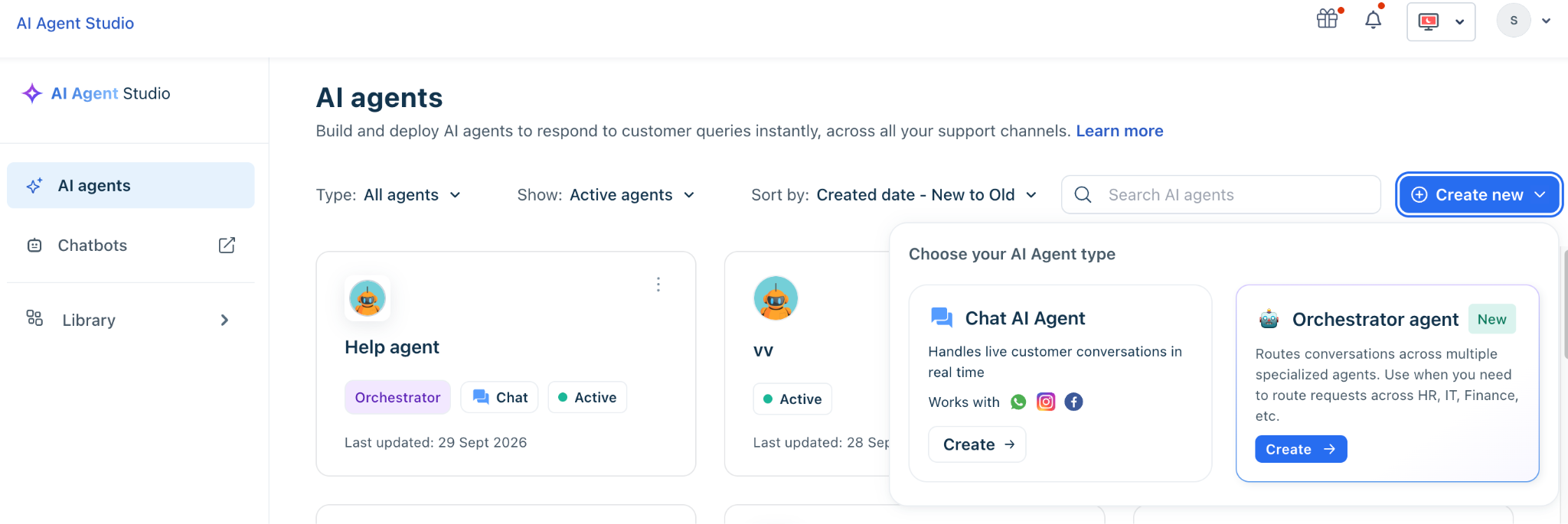
Select the primary language for the agent.
Enter a name for the agent and select an avatar, and then click Create agent.
Step 2: Assign Sub-agents (Child Agents)
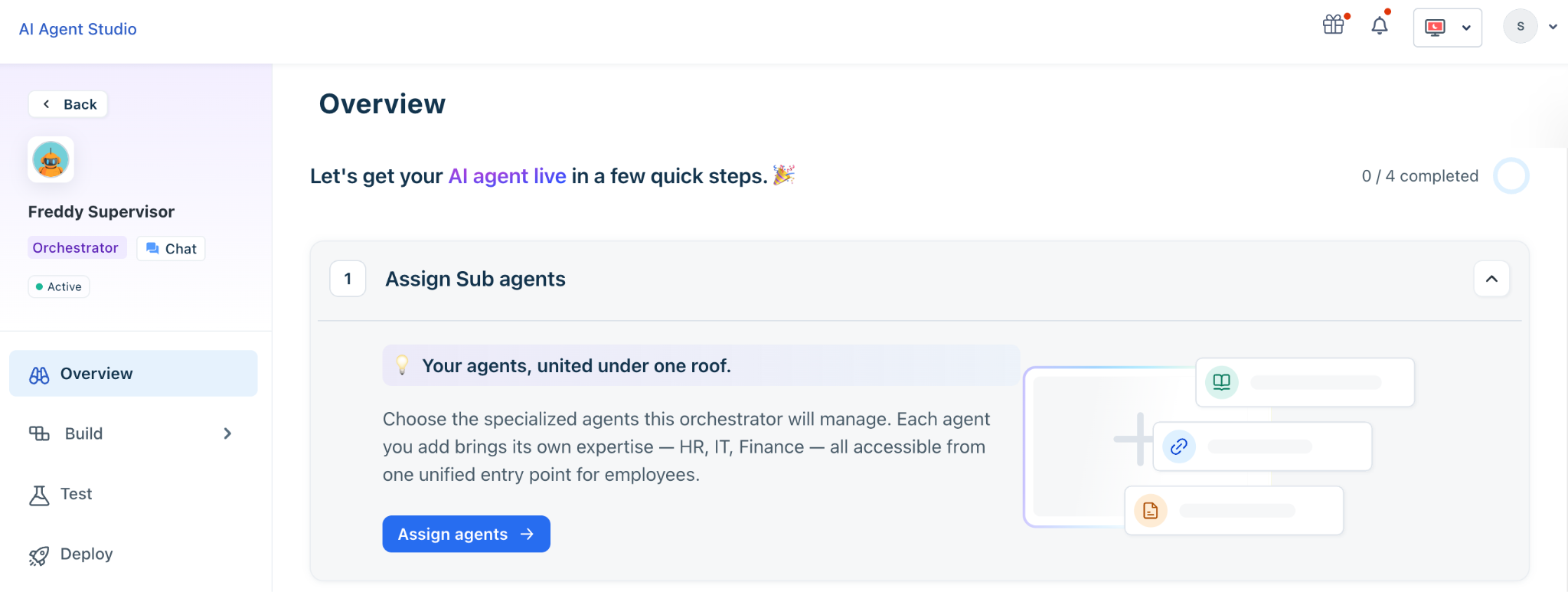
On the Orchestrator overview page, navigate to the Assign Sub-agents section.
Click Assign agent. This opens a panel displaying all available agents in your library.
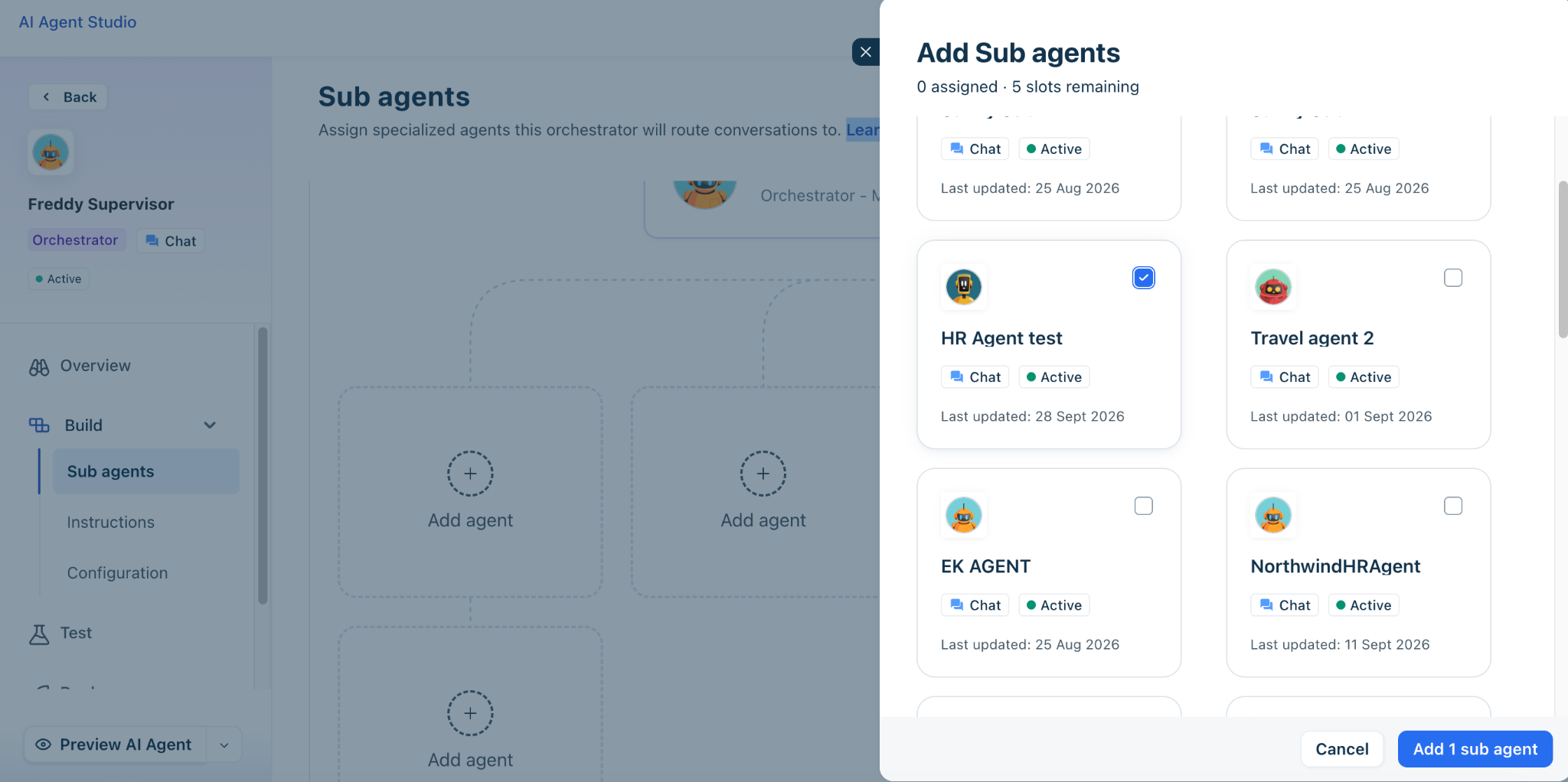
Select the domain-specific agents you wish to link to the supervisor (e.g., HR Assistant, IT support, Facilities). You must select a minimum of one sub-agent.
Click Add child agent to attach them to the orchestrator workflow.
Step 3: Configure Instructions
Go to the Instructions tab. The system will use a Large Language Model (LLM) to auto-generate baseline instructions and descriptions for the supervisor and the added sub-agents based on their metadata.
Enter your business context and define the rules.
Note: It is highly recommended that admins edit these instructions. You must explicitly write the business context and define the rules to ensure the supervisor knows exactly which query should be routed to which child agent.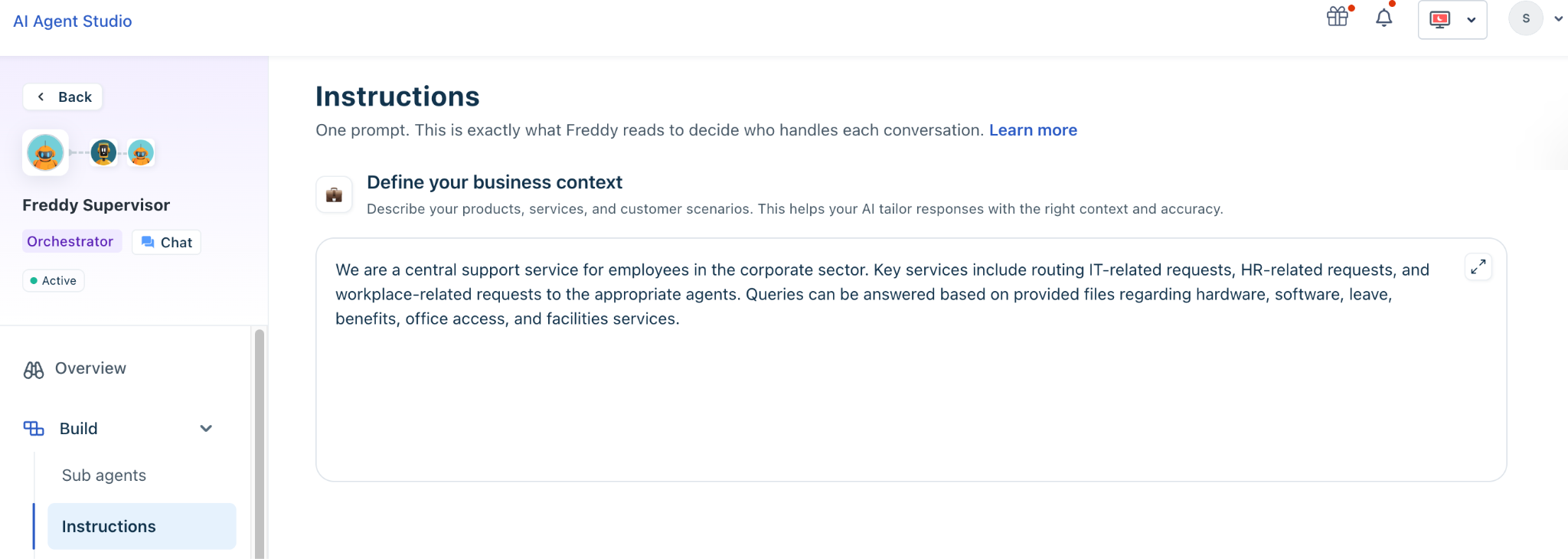
Set the routing instructions for all the sub-agents.
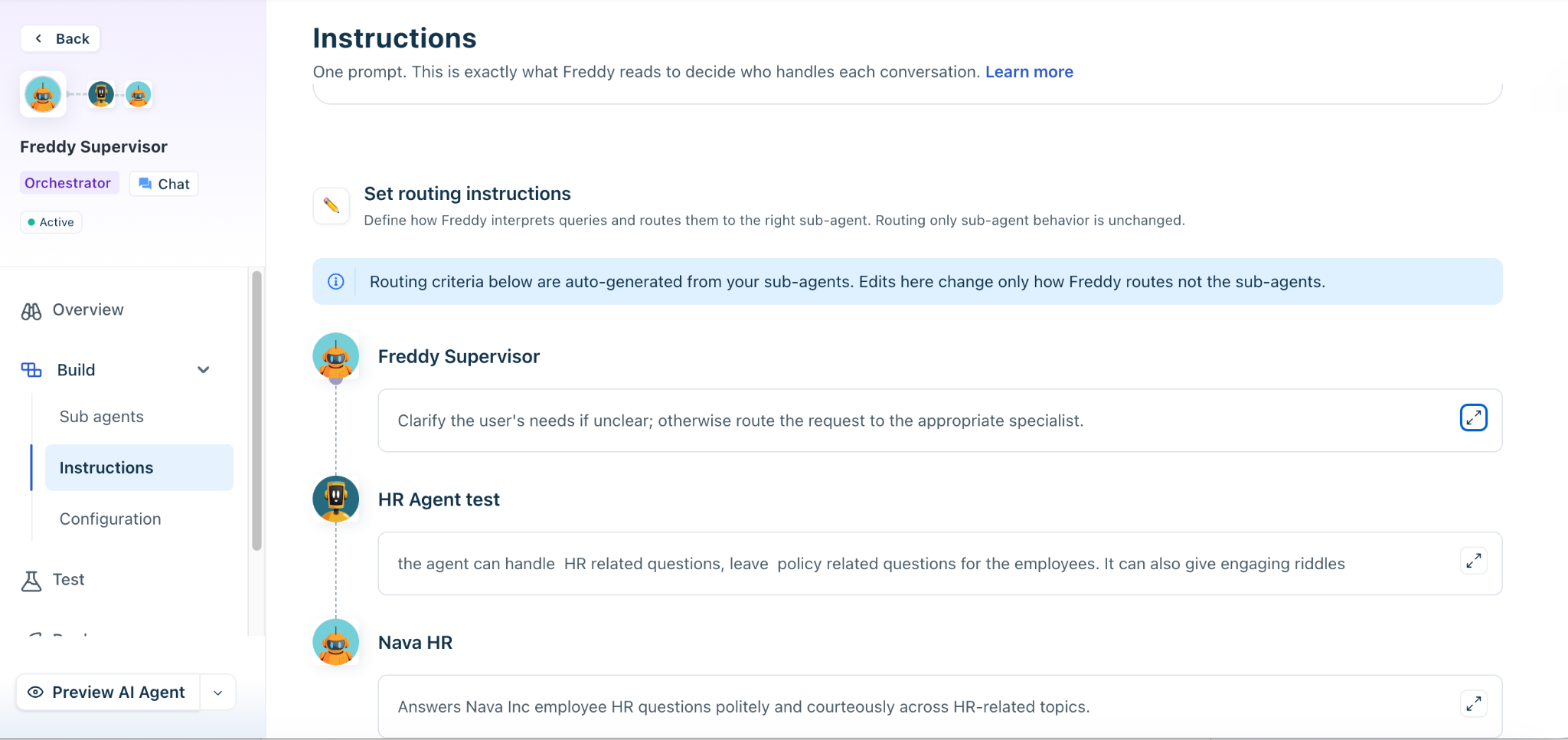
Step 4: Set Up Conversations and Configurations
Go to the Configurations tab to define the orchestrator's global behavior:
Multilingual Support: Enable the languages that are supported by your underlying child agents.
Introductory Message: Define a universal welcome message. The Orchestrator will override the individual introductory messages of the child agents to ensure the user is only greeted once.
Fallback Behavior: Configure messages for scenarios where the Orchestrator cannot identify the user's intent or cannot determine which child agent to route to.
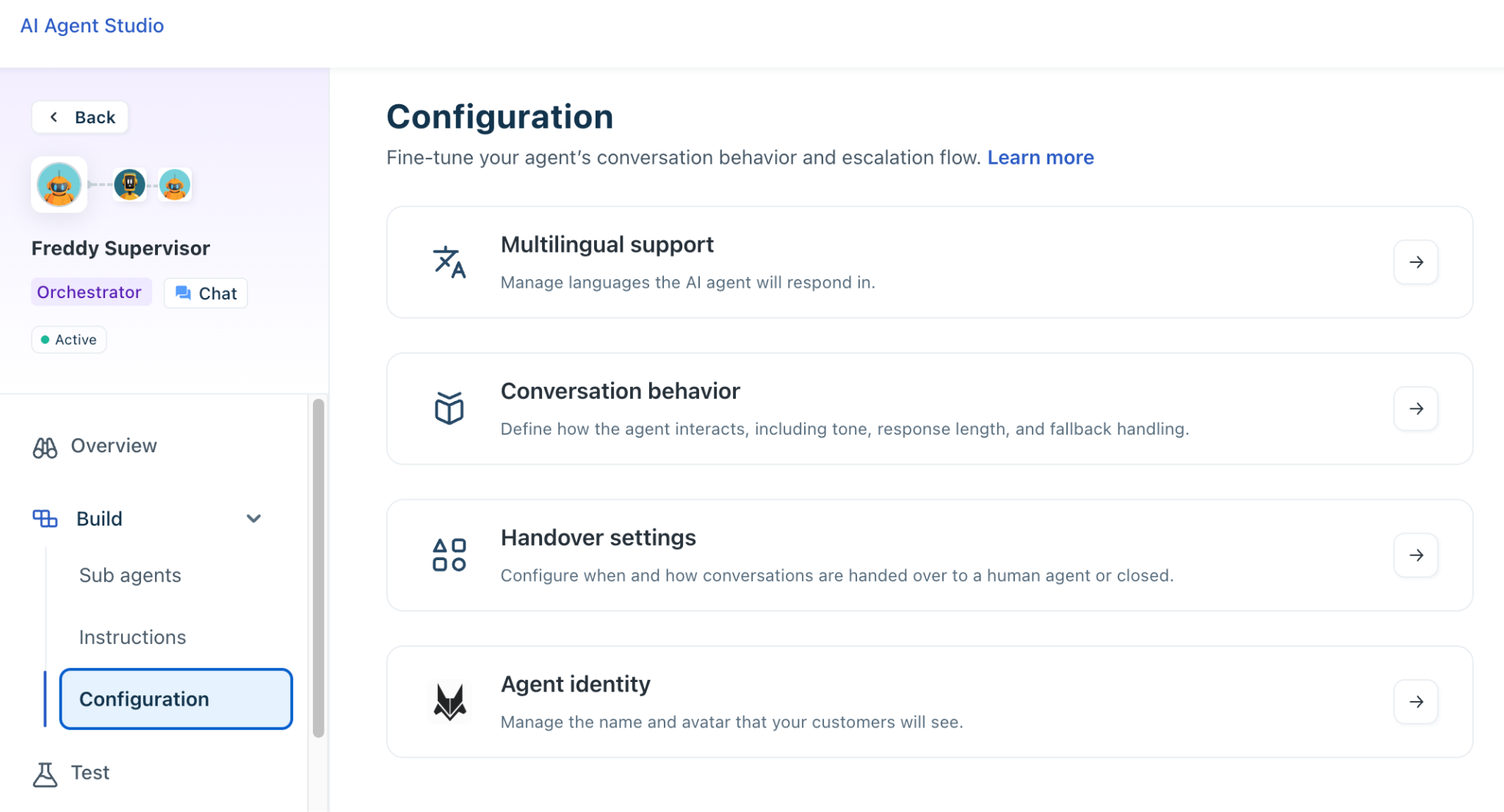
Step 5: Test the orchestrator
In the Test tab, enter user queries to test the agent’s response.
Input various cross-domain scenarios (e.g., ask for a laptop, then interrupt and ask for your leave balance).
The preview console will display tags indicating which specific sub-agent is actively handling and resolving the query. If misrouting occurs, return to the Instructions tab to clarify the agent descriptions.
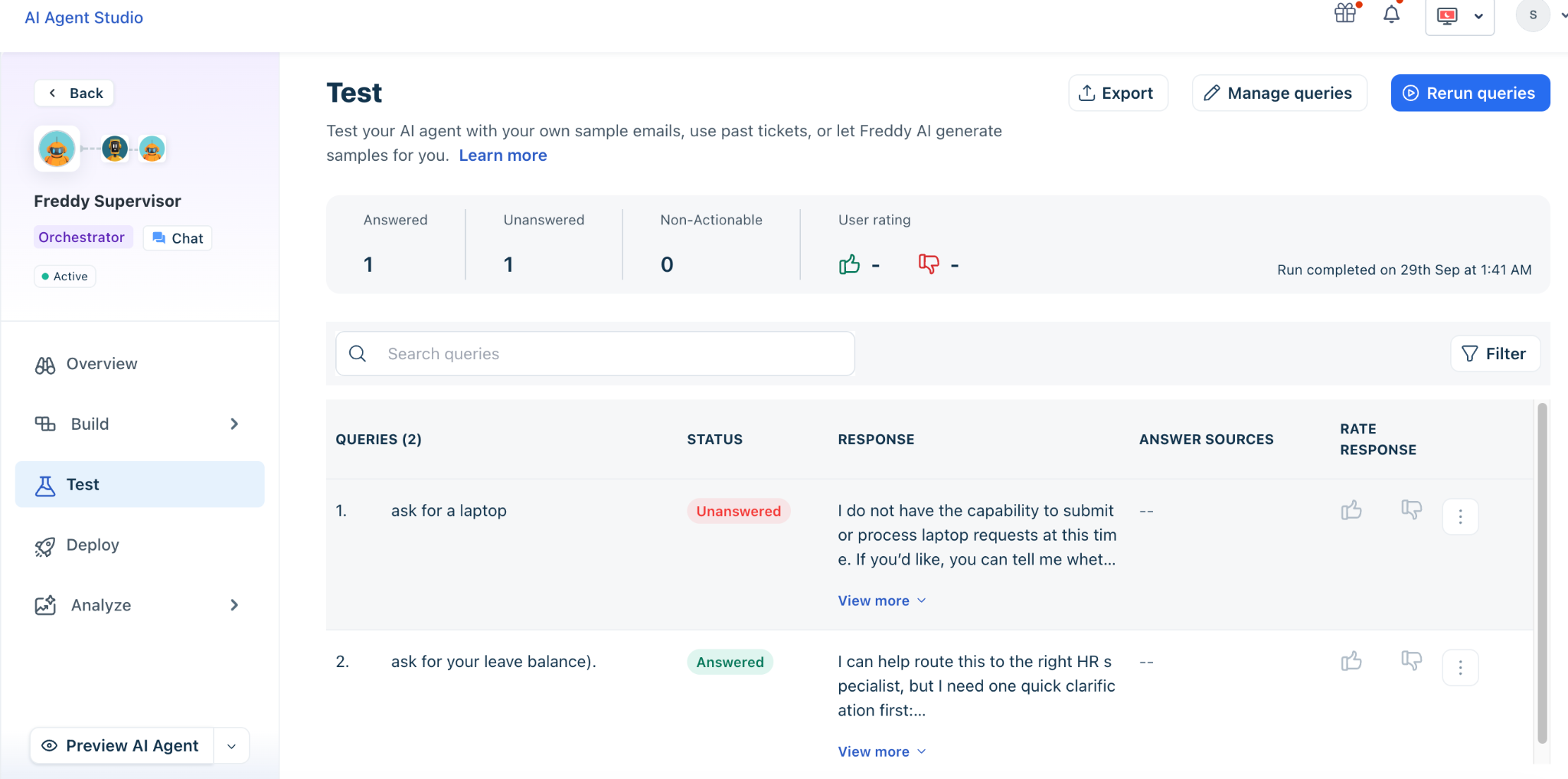
Step 6: Deploy the agent
After validating the routing behavior, deploy the Orchestrator Agent to the required communication channels.
Open the Deploy section.
Select the communication channel where you want to deploy the agent.
Configure the required channel settings.
Complete the deployment.
The deployment experience follows the same approach used for individual AI agents. Depending on your configuration, you can deploy the Orchestrator Agent to supported channels such as Slack, Microsoft Teams, or the Support Portal.
Manage child agents
Child agents remain independently configurable after they are added to an Orchestrator Agent. You can update a child agent's:
Instructions
Knowledge sources
Workflows
Integrations
Access controls
Deployment configuration
Manage domain-specific configuration within the respective child agent. If a change affects the agent's responsibilities, review the Orchestrator Agent's instructions to ensure that requests continue to route correctly.
Configure access and security
Child agents remain the source of truth for their configured access controls. Continue to manage role-based access control (RBAC) and access control lists (ACLs) at the child-agent level. When configuring an Orchestrator Agent, verify that:
Users can access the required channel.
Child agents have the appropriate permissions.
Knowledge sources are accessible to the child agents that require them.
Workflows and integrations have the required access.
Use case: Employee onboarding
Employee onboarding often involves multiple departments, each with its own policies, systems, and workflows. An Orchestrator Agent can coordinate specialized child agents to manage these activities while providing the employee with a single conversational experience.
In this example, the employee submits an onboarding request to the Orchestrator Agent. The Orchestrator Agent delegates the required tasks to the HR, IT, Finance, and Facilities agents. Each child agent handles its assigned tasks and returns the status to the Orchestrator Agent, which provides a consolidated update to the employee.
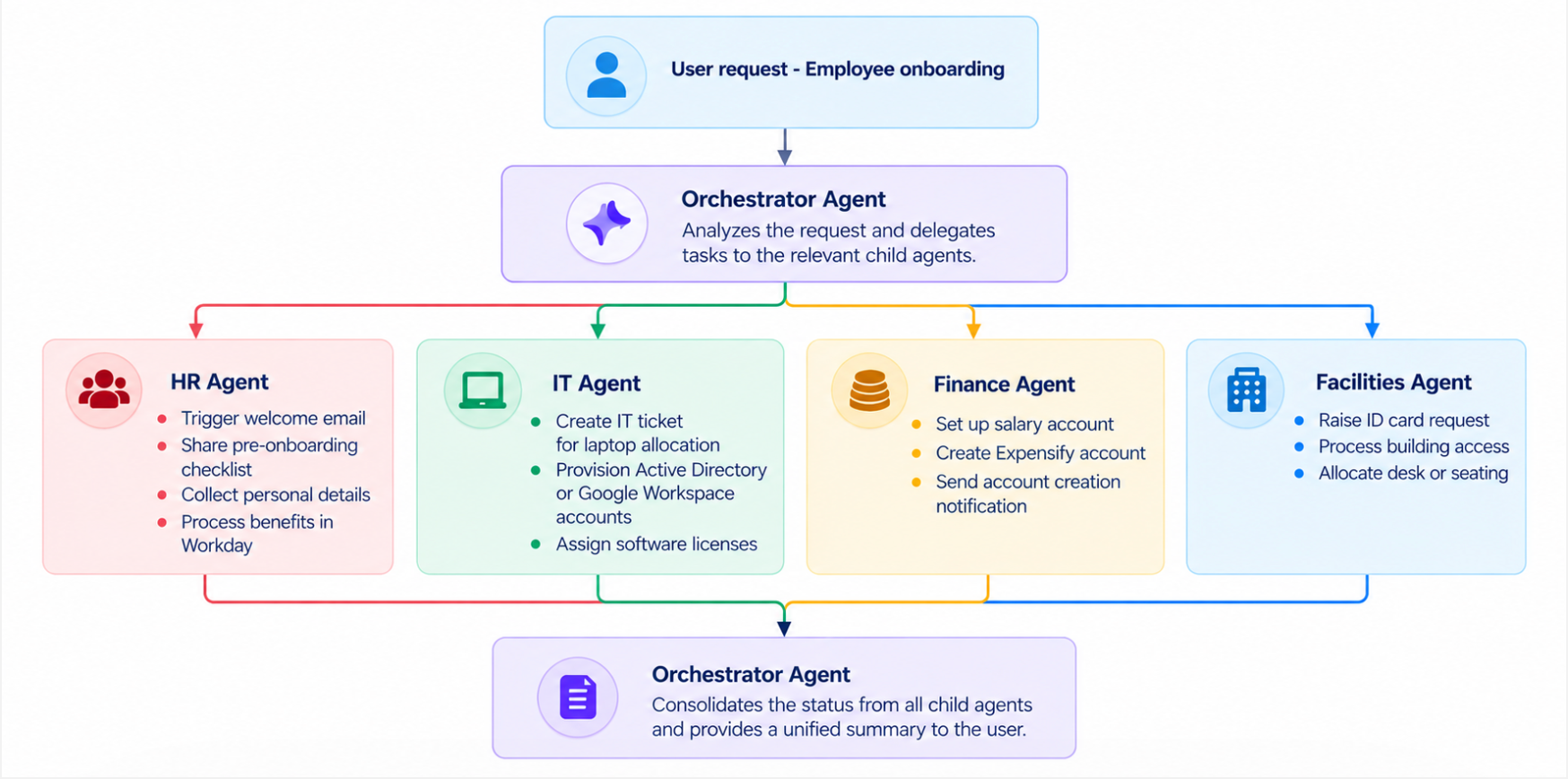
Best practices
Follow these practices when configuring an Orchestrator Agent.
Define distinct agent responsibilities - Give each child agent a clearly defined domain. Avoid assigning multiple child agents the same responsibilities unless the routing instructions explicitly distinguish between them.
Keep routing instructions specific - Describe the types of requests each child agent should handle and identify requests that should not be routed to that agent.
Test cross-domain conversations - Do not test only individual questions. Test conversations in which the user changes topics or moves between departments.
Test ambiguous requests - Test requests that could belong to more than one domain. Use the results to refine the business context and routing instructions.
Review fallback behavior - Ensure that users receive a clear response when the Orchestrator Agent cannot determine the appropriate child agent or when a child agent cannot resolve a request.
Maintain child agents independently - Keep domain-specific knowledge, workflows, and integrations within the appropriate child agent. This allows domain teams to update their agents without unnecessarily changing the orchestration layer.
Troubleshoot routing issues
If the Orchestrator Agent routes a request to the wrong child agent, review the following: