
 Community
 Video Library
 Agent Training
 Freshservice
 Freshdesk
 Freshchat
 Freshcaller
 Freshsales
 Freshteam
 Freshworks Neo
 Freshsurvey
 Freshservice for MSP
 The following FAQs address common questions and clarifications regarding MCP integration.
Info: For an overview of MCP integration, including setup and configuration steps, see the MCP integration article.
TABLE OF CONTENTS
- Understand MCP
- Setup and configuration
- Security and access control
- Capabilities and limitations
- Billing and pricing
Understand MCP
What is the Model Context Protocol (MCP)?
The Model Context Protocol (MCP) is an open standard that enables AI tools, such as Claude, Gemini, and Microsoft Copilot, to connect directly to Freshservice. Through MCP, these tools can perform actions on your behalf, such as creating tickets, looking up assets, or fetching service catalog items, without leaving the AI tool’s interface.
Which AI clients are supported?
MCP works with any AI tool that supports the MCP standard. Freshservice is natively listed as a connector in Claude and Google Gemini, so you can connect without any manual configuration. For all other MCP-compatible clients, you can connect by using the MCP server URL provided in your administrator settings.
Setup and configuration
What are the prerequisites for OAuth-based MCP integration?
Before you begin, ensure that you have a Freshworks Developer account. If you do not have an account, contact your organization's administrator to request an account before proceeding with the integration.
How do I find my MCP settings in Freshservice?
Go to Admin Settings > MCP > MCP Details. From this page, you can manage your MCP server.
Is MCP enabled by default?
Yes. MCP is enabled by default for your Freshservice instance. Administrators can disable it at any time by going to Admin Settings > MCP > MCP Details.
How does authentication work for MCP?
Freshservice MCP supports two authentication methods. OAuth 2.0 with Dynamic Client Registration (DCR) is the recommended method. With DCR, the AI tool registers automatically, and users authorize access through a standard OAuth consent flow, with tokens scoped per user. For AI tools that do not support OAuth, API key authentication is available. In this method, each user connects by using their individual Freshservice API key.
Are OAuth credentials managed individually?
No. OAuth client registration is managed at the account level. This ensures that permissions and integrations remain consistent across the entire organization.
How do I view my registered AI tools?
To view a list of your registered AI tools:
Go to your Freshservice account.
Click the Marketplace Apps icon in the upper-right corner, and then select Developer Portal.
Select your developer account.
On the Freshworks Developer page, select the Settings (gear) icon next to your profile icon.
Go to the OAuth Credentials section, and then select View existing OAuth credentials.
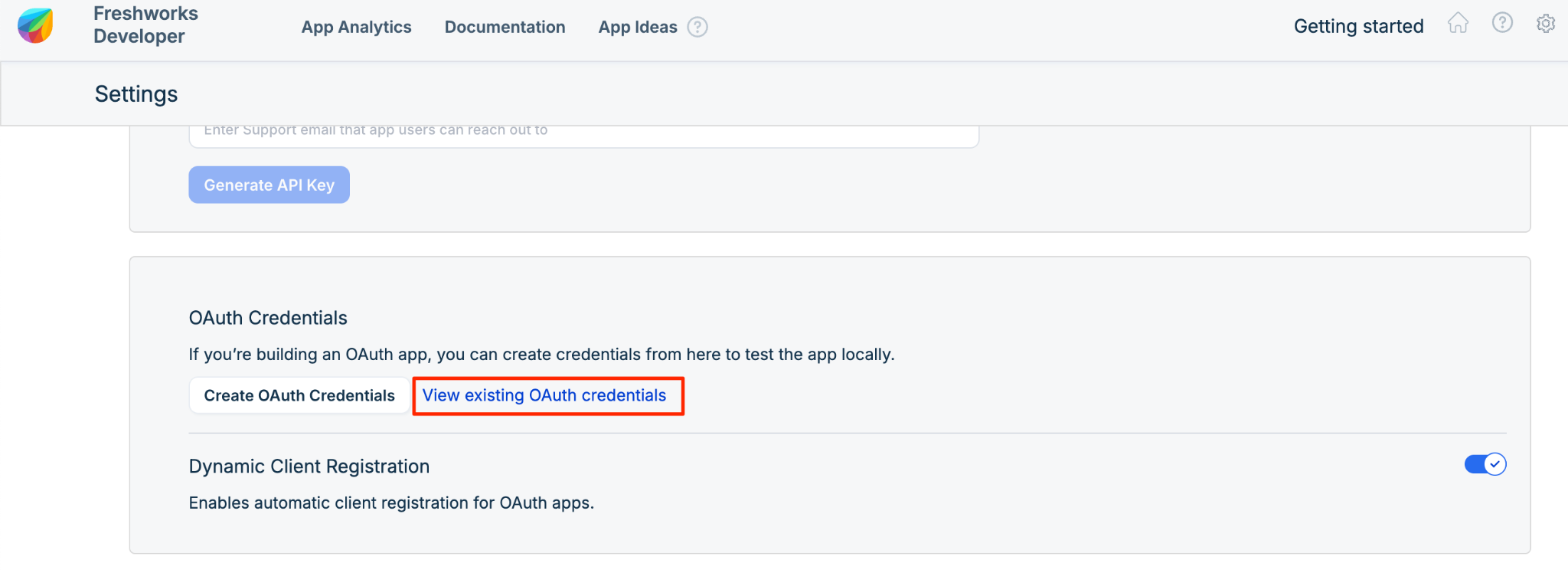
Note: Client registration is managed at the account level, not the individual user level.
Can I control which tools or actions are available through MCP?
Yes. Administrators can enable or disable individual tools within each MCP server configuration. Tools that are not enabled are not discoverable or callable by the connected AI tool. Administrators can also create multiple named MCP server configurations with different toolsets for different teams or use cases.
How do I revoke OAuth access for an MCP client?
If you need to revoke access for a specific client:
Go to your Freshservice account, click your profile icon in the upper-right corner, and then click Profile settings.
On the Edit Profile page, click Modify Personal Information.
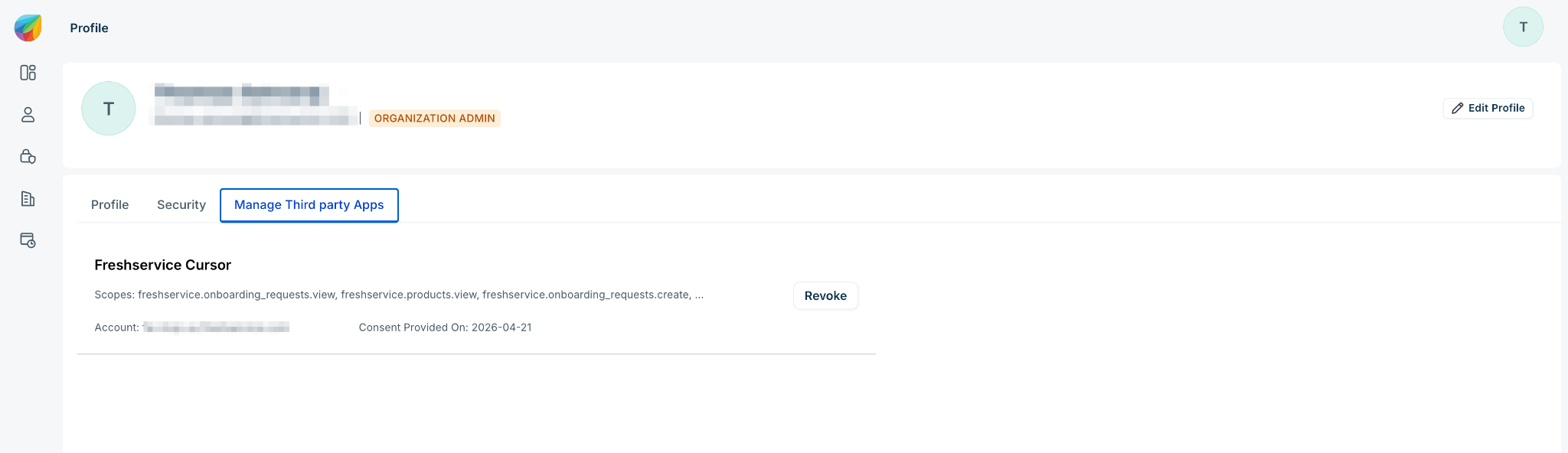
Go to the Manage Third-party Apps tab.
On the relevant OAuth card, click Revoke.
Security and access control
Who can use MCP to interact with Freshservice?
Administrators control access to MCP. The actions available through MCP strictly match the permissions granted by the user's Freshservice role. MCP does not grant additional permissions.
Can an AI agent access data that a user is not permitted to see?
No. MCP calls execute within the context of the authenticated user. All role-based access controls, field-level permissions, and data scoping rules in Freshservice apply to MCP requests exactly as they do to user interface (UI) actions.
Capabilities and limitations
What actions can an AI agent take through MCP?
Available actions include creating, updating, and fetching tickets; searching the service catalog; fetching and updating assets; and looking up users and groups. To view the complete list of available tools, see List of available tools.
Does MCP work in real time?
Yes. MCP calls execute in real time against your live Freshservice data.
What happens if an AI agent sends an unsupported or invalid request?
The MCP server returns a structured error to the AI client. The client then handles the error gracefully and informs the user.
Billing and pricing
What counts as an MCP action?
Any call to an MCP server counts as one action, regardless of whether it reads or writes data, and regardless of which AI client made the call.
How many MCP actions are included in my plan?
MCP is available on the Growth, Pro, and Enterprise plans. Each plan includes a monthly MCP action allowance, as outlined in the solution article. The action count resets at the start of each billing cycle.
Will unused MCP actions roll over to the following month?
No. MCP action allowances are tied to your current billing cycle and do not roll over.
Will I receive notifications before reaching my action limit?
Yes. Account admins receive notifications as usage approaches the limit. Notifications are sent when usage reaches 50%, 75%, 90%, 95%, 99%, and 100% of the allowance.
Can I purchase additional MCP actions?
Yes. You can purchase an MCP Action Pack add-on to increase your monthly allowance. Contact your account manager or visit the billing section in your administrator settings to purchase an add-on. See Pricing for details.
How will customers participating in the EAP transition to the GA pricing model?
If you participated in the Early Access Program (EAP), which had no pricing, your account will automatically transition to the general availability (GA) pricing model. No action is required on your part.
Note: If you were on the Early Access Program (EAP), standard pricing and limits take effect on October 5, 2026.Does the pricing change require me to reconfigure my MCP connections?
No. Pricing changes do not affect your existing MCP setup or connections.