
 Community
 Video Library
 Agent Training
 Freshservice
 Freshdesk
 Freshchat
 Freshcaller
 Freshsales
 Freshteam
 Freshworks Neo
 Freshsurvey
 Freshservice for MSP
 TABLE OF CONTENTS
- Overview
- Assignment criteria
- License assignment logic
- Assignment guardrails
- Administrator notification
- Opt out of automatic license assignment
Note: Freshservice has completed the automatic assignment of Freddy AI Copilot licenses for eligible customers who had unassigned licenses available as of July 23, 2026. This one-time allocation exercise was completed by August 24, 2026. No further automatic assignments are currently planned.
This article explains how Freshservice evaluates accounts, assigns available Freddy AI Copilot licenses, and notifies administrators before the assignment is made.
Overview
To help you get the most value from the Freddy AI Copilot licenses you purchased, Freshservice identifies any unassigned licenses and assigns them to agents who meet the eligibility criteria. This ensures maximum utilization of purchased licenses, extends Freddy AI Copilot access to more eligible agents, and reduces the administrative effort of manually assigning available licenses.
Before assigning any license, Freshservice evaluates your account against a set of predefined criteria, described in the following section, and proceeds only when all applicable criteria are met.
The assignment process draws only from the licenses in your account that are not assigned. It does not purchase additional licenses, modify your subscription, or assign more licenses than your organization has purchased.
Assignment criteria
Freshservice evaluates agents based on their agent role and existing Freddy AI Copilot license status before assigning any license. The following criteria determine which agents are eligible for automatic assignment:
Full-time IT agents and full-time business agents are eligible for assignment.
Occasional, deactivated, and deleted agents are not eligible.
Agents who already have the Freddy AI Copilot license are not eligible.
Administrators can adjust these agent assignments at any time from the Admin console.
License assignment logic
Once Freshservice identifies the eligible agents in your account using the criteria above, it checks the number of unassigned Freddy AI Copilot licenses against each of the following conditions to determine how licenses are assigned. The table below describes each condition and its corresponding assignment behavior.
Each condition is checked as a complete group: if there aren't enough unassigned licenses to cover every eligible agent in a group, Freshservice does not assign any licenses to that group, rather than assigning licenses to some agents and leaving others without one. If none of the three conditions are met, Freshservice does not automatically assign any Freddy Copilot licenses.
Example
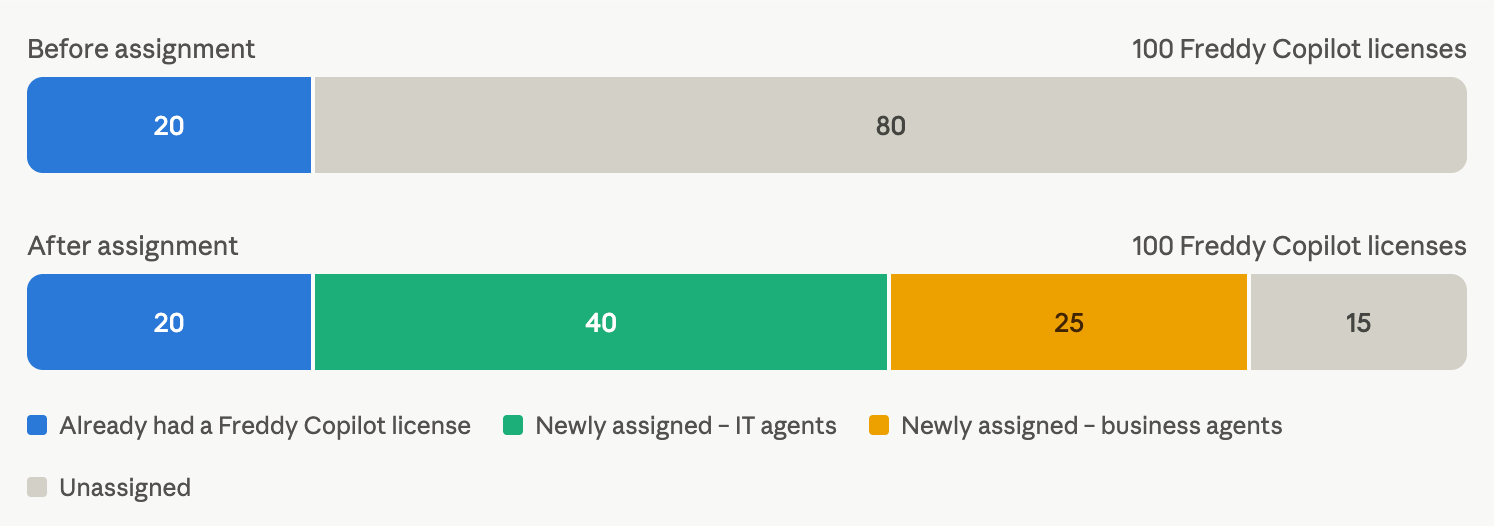
Consider an account with 100 Freddy AI Copilot licenses. Each bar below represents the full pool of 100 licenses, split into colored segments. Compare the two bars to see how unassigned licenses (gray) convert into new assignments (green and yellow) once the auto-assignment is complete.
Of 60 full-time IT agents and 25 full-time business agents, 65 do not yet have a license. With 80 unassigned licenses available, Freshservice assigns all 65 agents, leaving 15 licenses unassigned.
Assignment guardrails
Regardless of which condition applies, Freshservice always follows these rules when assigning Freddy AI Copilot licenses:
Only unassigned licenses already in your account are used; Freshservice never purchases additional licenses to complete an assignment.
Only full-time IT agents and full-time business agents are eligible.
An agent who already has the Freddy Copilot role is never assigned a second license.
Licenses are assigned to a whole eligible group at once, never partially within a group.
Administrator notification
If your account is included in the upcoming automatic license assignment exercise, then Freshservice notifies your account administrators in-product before the assignment takes place. This notification is visible only to administrators and remains visible until the scheduled assignment date.
The notification includes:
The date on which Freshservice will automatically assign the licenses.
Information about the automatic assignment process, along with instructions for opting out.
If your account does not receive this notification, it is not included in the current assignment cycle.
Opt out of automatic license assignment
To prevent Freshservice from automatically assigning available Freddy AI Copilot licenses, contact Freshservice support at support@freshservice.com before the scheduled assignment date shown in your notification.