
 Community
 Video Library
 Agent Training
 Freshservice
 Freshdesk
 Freshchat
 Freshcaller
 Freshsales
 Freshteam
 Freshworks Neo
 Freshsurvey
 Freshservice for MSP
 Overview
Non blocking workflow execution is a capability introduced to make automation more seamless - by executing workflows on a ticket/change when that entity is still waiting for an approval.
Each workflow operates independently, allowing for greater efficiency while handling approvals and executing tasks not related to the approval in parallel.
What are the key benefits?
Multiple workflows can now execute in parallel without waiting for an approval outcome, resulting in faster automation and efficient process handling.
Teams gain flexibility, as subsequent workflow actions are no longer blocked by approvals from earlier workflows.
Accelerate the handling of tickets and requests by eliminating approval-related bottlenecks.
Why do customers need this?
Traditional behaviour would block all other workflows on a ticket/change when there is an approval pending on a previous workflow, making the system less agile.
Non-blocking execution helps organizations handle complex scenarios with layered or parallel processes, supporting modern and enterprise automation needs.
Customers can address operational needs that require multiple conditions or actions to progress independently, improving productivity and reducing time-to-resolution.
What is changing compared to before?
Previously, when a workflow triggered an approval, any subsequent workflows matching the same event and conditions would remain blocked (even after the approval is completed).
With non-blocking execution, once an approval email is sent, other workflows can proceed immediately, without waiting for the first approval’s outcome.
This is a major shift from sequential to parallel workflow handling within approval processes, enhancing concurrency.
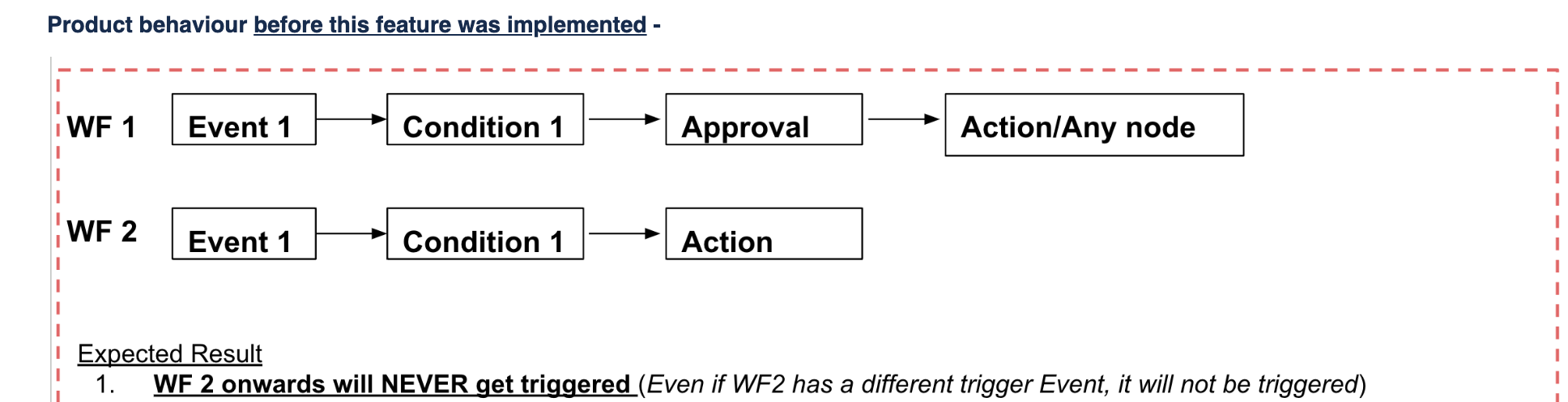
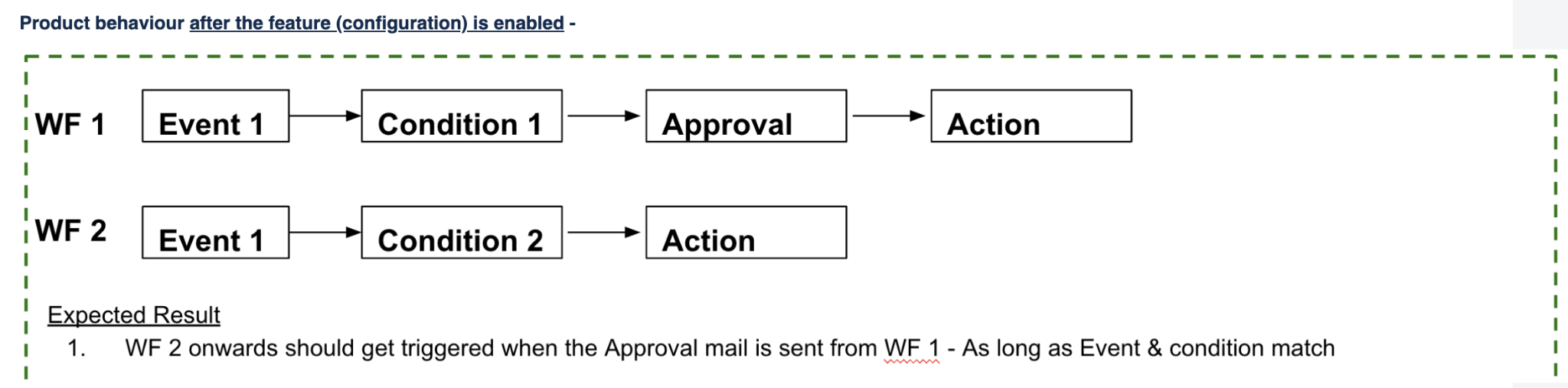
Scenario for illustration
Say there is an approval configured in an action node in a workflow.
There IS another node after that action node.
Current Behaviour -
Subsequent workflows will not execute and will be blocked.
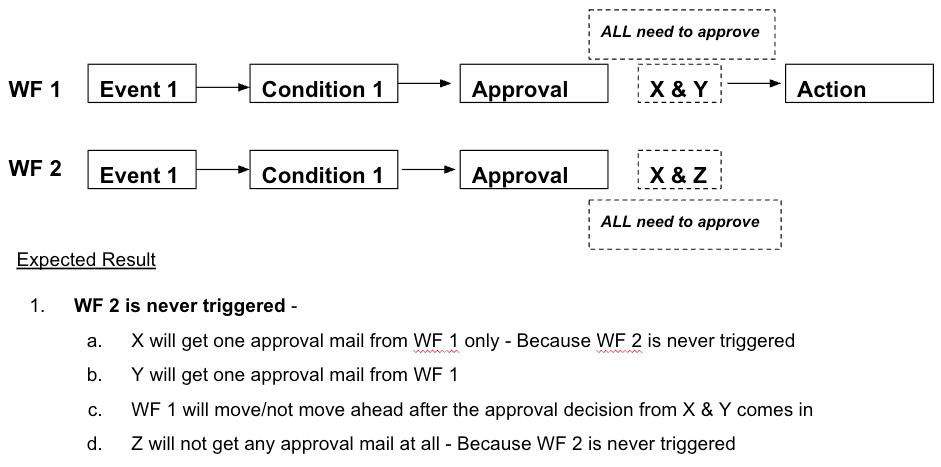
New Behaviour
Non-Blocking workflow execution configuration - needs to be TURNED ON by customers after reviewing and reconfiguring workflows which have approvals.
We recommend turning this ON along with the new approvals process for the best positive impact ion terms of process efficiency.
Global Settings > Workflow Automator > Settings
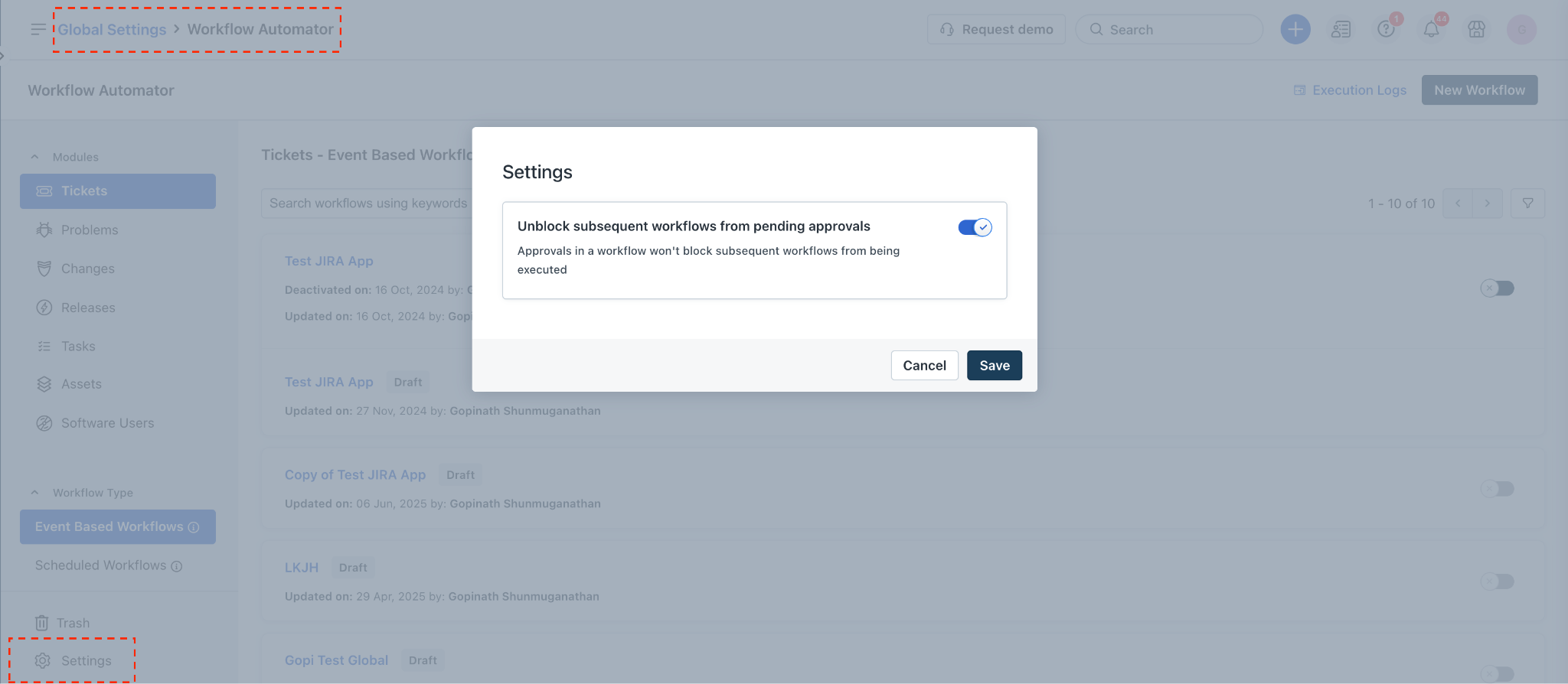
After the toggle is turned ON -
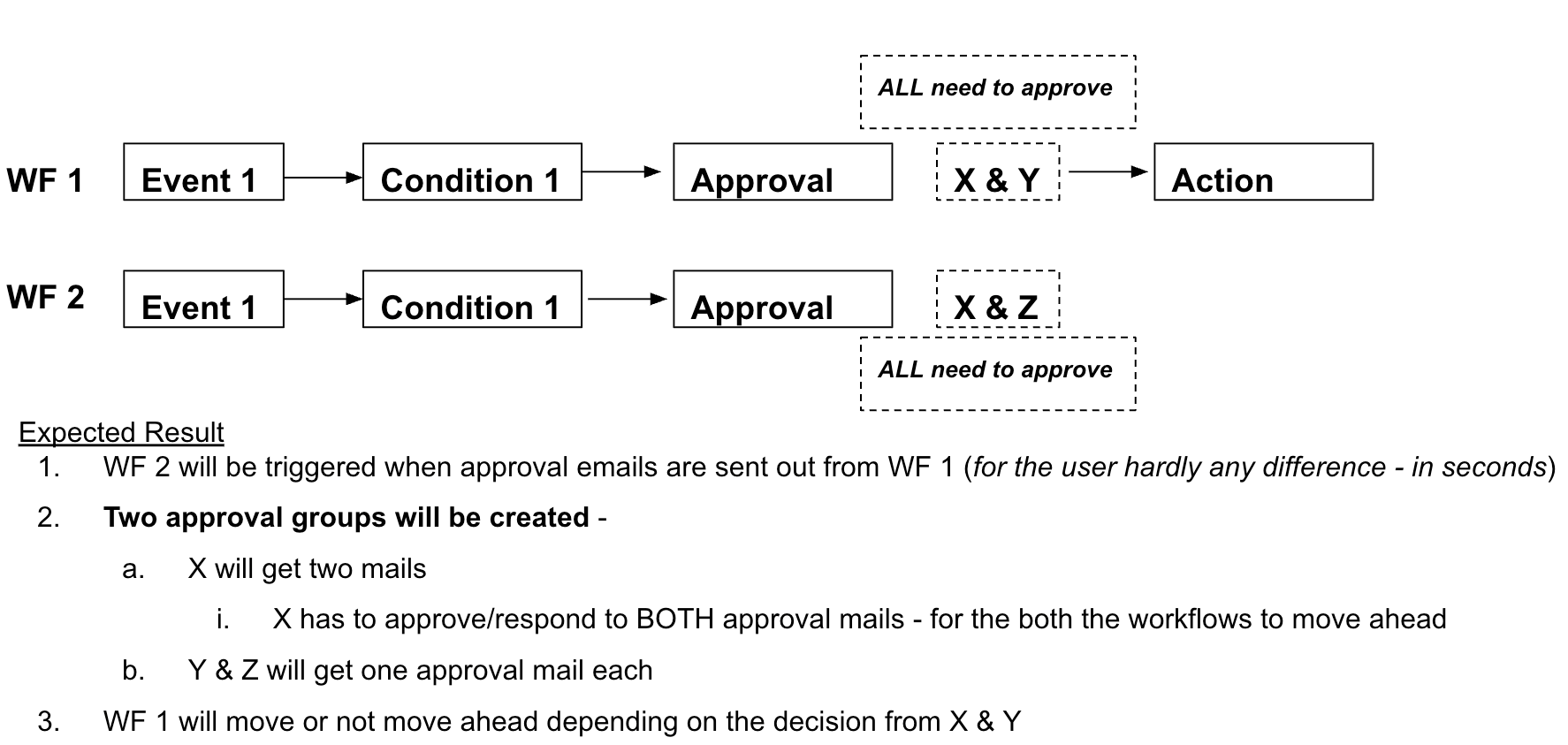
Basically, when the approval decision is received from Group 1 (X & Y), the workflow which is waiting for the same - Workflow 1 - that workflow alone can move ahead.
How will this impact existing customers?
Existing customers will find previously blocked workflows now executing in parallel, once an approval is sent out from a previous workflow.
The change will be default for all customers from May 2026, but needs explicit enablement for current/early-access users.
What are the required actions for customers?
Review all current workflows having approvals configured.
Areas of impact -
If there are nodes AFTER the approval in a workflow - be aware that subsequent workflows will have to be verified.
Subsequent workflows that DO NOT execute today will start executing the moment the approval is sent out.
Re-order or modify workflows to ensure that the new parallel execution model does not trigger actions unintentionally or in the wrong sequence.
Enable the non-blocking setting only after verification and all edits are complete.
Contact Freshservice support or your CSM to enable non-blocking for early access.
Sandbox and Production must be configured separately for this feature; enabling it in one does not sync to the other.
What if a customer wants to turn ON the configuration before adopting the new approvals process?
Say workflow 1 has an Approval Node > Action node.
If a "Send approval" action is configured in workflow 2, 3 onwards -
These workflows will execute the moment Approval email is sent from WF 1.
These approvals sent from workflows 2, 3 will all get merged into one single approval group in the ticket/change.
The most recent approval's rule (Everyone, Anyone etc) will override all the previous ones - workflow #3 in the below example.
If parallel approvals feature is adopted - Approvers from each workflow will be grouped separately with a separate approval rule;
The merge will not happen and approvals will be distinct/separate groups.
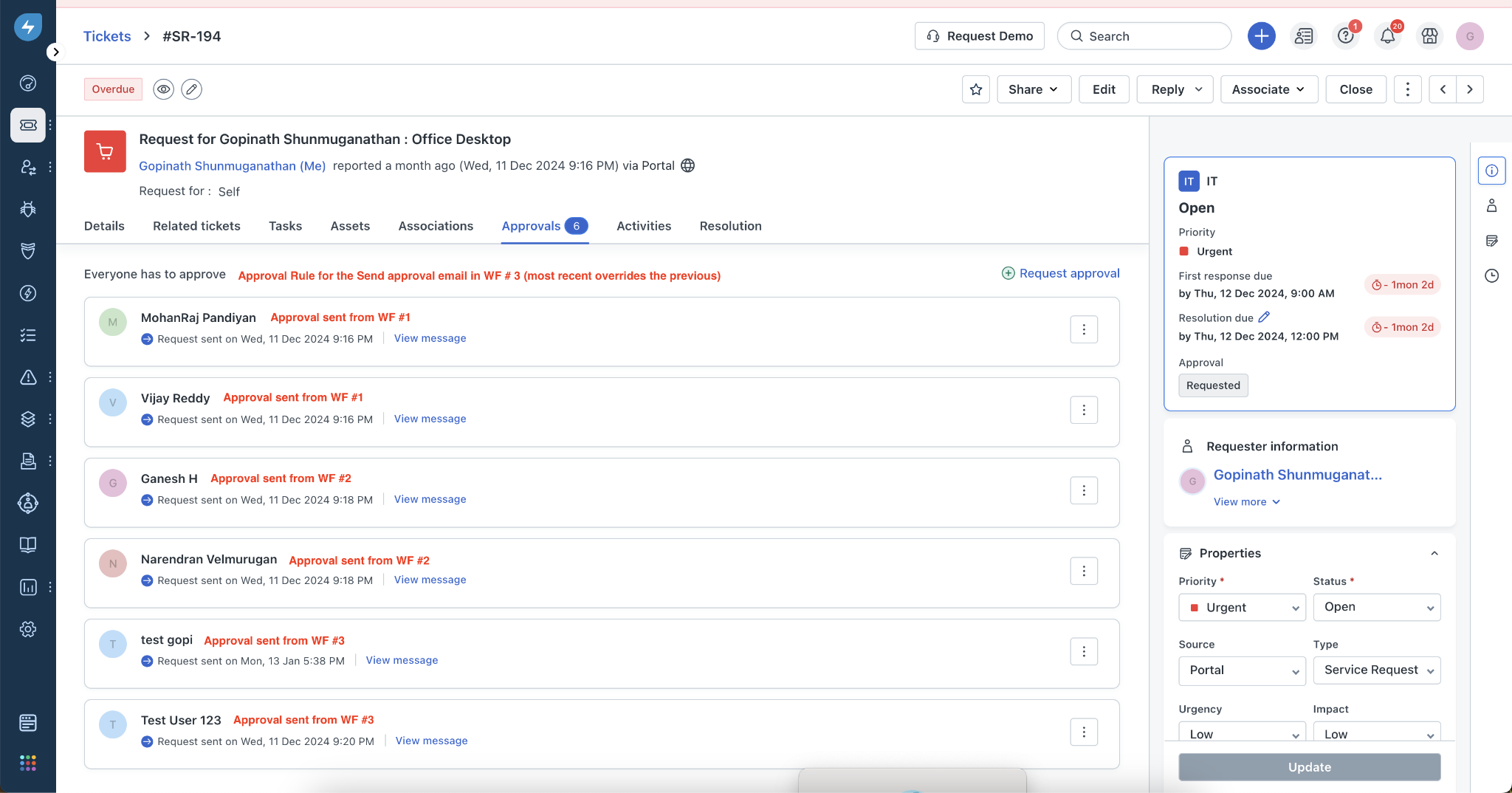
Since multiple workflows have approval emails - which workflow will execute after the approval decision comes in?
The latest workflow in the sequence will only move ahead - WF #3 in the above example.
Why? This is because all approvals are merged currently into one group.
The system is not able to apply the approval decision against the respective workflow.
Even if approvers who get mails from WF #1 and 2 approve - those workflows will not move ahead.
After parallel approvals feature is adopted - all the workflows will move ahead depending on the “execute workflow” configuration in each.