Community
 Video Library
 Agent Training
 Freshservice
 Freshdesk
 Freshchat
 Freshcaller
 Freshsales
 Freshteam
 Freshworks Neo
 Freshsurvey
 Freshservice for MSP
 Basic Troubleshooting Steps
Look for an answer to the following questions:
- Was it working earlier? If yes, Is it happening only for this action or all other actions too?
- What is OS Version?
- When did Cx install OSR?
- Are DC and OSR within reach?
- Is the user of the Active Directory Orch app added to the Remote Management Group/Administrators Group?
- If customer is passing values through placeholder values then please a note before the app node to print and check if the values are correct ?
- Check latest version from this URL : https://fstools.freshservice.com/OSR/productionVersion.json
Reference: https://confluence.freshworks.com/pages/viewpage.action?pageId=372848047
Location of logs files
- C:\Program Files\Freshworks\Orchestration Server\osr\logs (all files)
- C:\Program Files\Freshworks\Orchestration Server\osr\embed\services\orchestrator-winrm-service-win.out
- C:\Program Files\Freshworks\Orchestration Server\osr\embed\services\orchestrator-winrm-service-win.err
1. WinRM::WinRMAuthorizationError
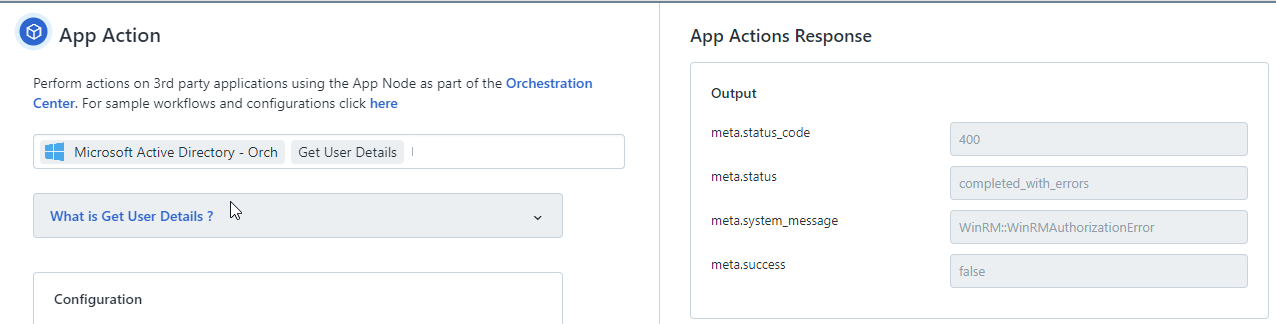
Sol: This error generally occurs when the user added in the MS AD orchestration app does not have proper rights, and hence the WinRMAuthorizationError occurs.
1. Check if system requirements are fulfilled for the Orchestration server VM.
2. All the Active Directory credentials entered in the app config are correct.
2. All the Active Directory credentials entered in the app config are correct.
Issues in communication between the Orchestration server and the Active Directory Server:(If they have MS AD)
1. Ensure that port 5985 of the Active Directory server is accessible from the Orchestration server (VM). Telnet to 5985 with the private IP of the AD server.
2. If you're not able to telnet, ensure that internal port 5985 is not blocked in your firewall.
WinRMAuthorizationError:
1. Ensure that the user (whose credentials are added in-app config) is added to the built-in group in AD called "Domain Users and Remote Management Users"
2. Attempt with Administrator credentials.
1. Ensure that port 5985 of the Active Directory server is accessible from the Orchestration server (VM). Telnet to 5985 with the private IP of the AD server.
2. If you're not able to telnet, ensure that internal port 5985 is not blocked in your firewall.
WinRMAuthorizationError:
1. Ensure that the user (whose credentials are added in-app config) is added to the built-in group in AD called "Domain Users and Remote Management Users"
2. Attempt with Administrator credentials.
Note: This is a configuration issue.
2. SSL_connect returned=1 errno=0 state=error: certificate verify failed(unable to get local issuer certificate)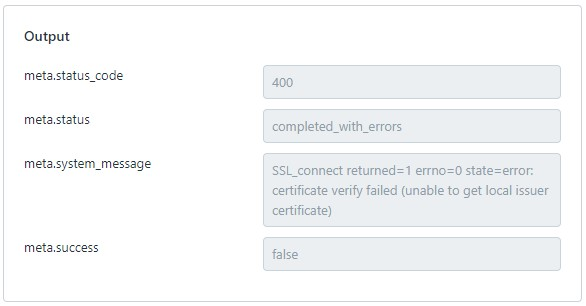
Sol: If there is no CA(Certificate Authority), Ideally, verification will not happen in the case of a self-signed certificate. It is meant for encryption only not for authentication. So whenever self-signed certificates are configured, then app configuration should be for key Disable SSL Certificate Verification has to be true.
If Certificate Authority is present then verify certificate chain with SSL Certificate Validator.
Please ask the Customer from which provider is the certificate signed with? Is it from an Enterprise CA? This will help us figure out if this can be configured or not, Otherwise they will have to proceed with the 5985 in App configuration.