
 Community
 Video Library
 Agent Training
 Freshservice
 Freshdesk
 Freshchat
 Freshcaller
 Freshsales
 Freshteam
 Freshworks Neo
 Freshsurvey
 Freshservice for MSP
 Why can't I link a JIRA issue in Freshservice/create a new issue via Freshservice (it never finishes loading)?
Make sure your JIRA credentials have the necessary permissions/access to create and link issues.
One way to check this is to log into your JIRA account with the same credentials used in Freshservice. Then, create an issue or link an existing issue to a problem within JIRA. If you are unable to do either, then it means you do not have the necessary permissions.
Webhook present in Jira still comments not added.
Two possibilities:-
- Maybe their IP is blacklisted by us,(check with DevOps to see)
- Check HTTP or HTTPS in the webhook URL.
Unable to link to a Jira existing issue in Freshservice or unable to create an issue in Freshservice, it shows a loading sign, and it keeps loading
401 (Unauthorized) response - It’s most likely a permission problem. Ask the customer to log in to Jira using the same credentials he entered in Freshservice. Then ask him to create an issue or link to existing issues based on his problem. He shouldn’t be able to create an issue in Jira if he is unable to do that in Freshservice.
200 response - Sometimes this can be due to the customer not entering Jira Admin credentials in Freshservice, hence the current user credentials may not have enough permissions to fetch all Projects/Issues.
Why can't I link a JIRA issue in Freshservice/create a new issue via Freshservice (it never finishes loading)?
Make sure your JIRA credentials have the necessary permissions/access to create and link issues.
One way to check this is to log into your JIRA account with the same credentials used in Freshservice. Then, create an issue or link an existing issue to a problem within JIRA. If you are unable to do either, then it means you do not have the necessary permissions.
Why do I keep getting a “Could not process request” or “Login Failed” error while trying to install the JIRA integration?
This is caused by incorrect credentials. Please verify the following:
- Check the credentials - username, password and the domain entered.
- The user installing the app is an Admin in JIRA.
- Whether you've entered the JIRA admin username and not the admin email.
Why is it that a comment in JIRA is added in Freshservice under a different username?
a) We create a user in Freshservice to add Jira's comment as a note in Freshservice using Jira user email. The problem here is that his email id may be hidden, so we cannot fetch it. It’s a permission problem.(go to system->general configuration->edit-setting-> user email visibility). Change it to Public if it is hidden
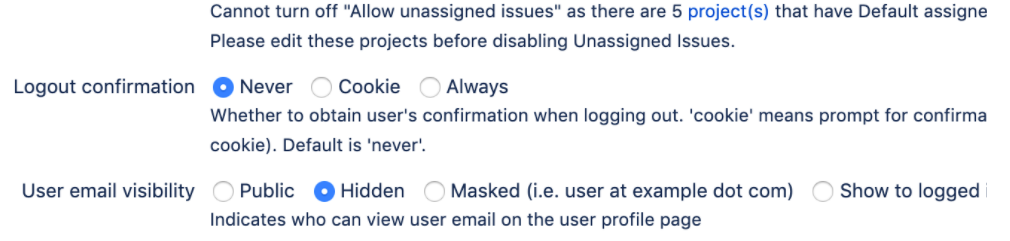
If this setting is set to Hidden, Freshservice will take the first agent in Freshservice (i.e Email id used to signup Freshservice account) as a note author in Freshservice.
If this setting is set to Masked, same Jira agent will be the note author in Freshservice.
b) Each Jira agent should go to the below link and change the Email address under the Contact section to Anyone.
https://id.atlassian.com/manage-profile/profile-and-visibility
Please verify the above a) and b) pointers for proper names being used for Jira to FS updates.
Why is a ticket created in Freshservice whenever a comment is added in JIRA?
This usually happens when you configure notifications in JIRA and it is linked to one of the support addresses configured in Freshservice. You can just remove the support email address from the notification settings within JIRA to prevent this.
Why aren't comments and updates in JIRA reflected in Freshservice?
Comments and updates from Jira to Freshservice happen with the help of the Jira webhook.
Please check the following,
a) Cross verify if the webhook present in Jira app's settings page matches with the webhook present in Jira webhooks(setting → system → webhook)
If it does not match then,
→ Go to the Freshservice integrations page and edit -> update the Jira Integration.
This will create a new webhook in Jira, then Jira to Freshservice sync should work fine now.
b) In case it still does not work, it means he has not entered his Jira credentials which do not have access to the webhook in Jira. It should be admin credentials. You can check that by asking the customer to enter the same credentials and login to his Jira account and go to the setting → system → webhook.
500 Internal Server Error response for Jira request.
Check the response of the request. If it is "Web Page Blocked!", ask the customer to check if the Issue exists in Jira.
Will Jira integration work for all modules?
Yes, rite from Jira 2.0 integration it’s available in ITIL modules: You can now link problems, changes, releases to Jira issues and track issue statuses within Freshservice.
Selecting a few projects does not render Issue types.
We are listing both private + public projects. Private projects that the user does not have access to cannot be fetched and so issue types cannot be loaded
“Could not process request” error while trying to enable Jira integration
Most likely credentials problem. Check for a valid username, domain, and password. It should be an admin user in Jira.
Do Jira support attachments?
Integrating Jira with Freshservice Support attachments from Freshservice to Jira for all modules. You also have the ability to turn off this option from integration settings.
Will Jira integration with Freshservice support custom status mapping?
Custom statuses can now be synchronized. You can now pick and choose statuses from Freshservice and map them to Jira statuses.
Why isn't status mapping in JIRA working for me?
- The integration only supports the English language in Freshservice for status mapping; other languages are not supported.
- Check if the relevant status is available on the workflows in Jira
Integrating Jira with Freshservice where the Jira integration uses Gsuite to log in
It is a known behavior that we need Jira login credentials to set up Jira Integration in Freshservice.
What is “Add a note and match visibility of Jira comments”?
In the scope for comment synchronization we have the option to set ‘add a note and match visibility” of Jira comments, enabling the user when adds a comment in Jira with restricted visibility, it will be added as a private note in Freshservice.
Who will be the requester of issues created in Jira from Freshservice?
Requester name for Jira issues created from Freshservice will reflect the name of the agent who created the Jira issue It will not be the admin who enabled the integration.
Will Freshservice integration with Jira supports the On-premise version?
The JIRA integration for Freshservice supports both on-demand and on-premise variants. On-Premise JIRA instance will be accessed using the Local IP or DNS Names. E.g.http://192.168.10.10:9090 or http://bug-server:909
What versions of Jira is supported in Freshservice integration?
Freshservice supports integration from JIRA 4.x up to the latest version - JIRA 5. Please note that If you are looking to install the Freshservice - JIRA integration to work both ways, you will have to upgrade your JIRA setup to version 5.2 or above. This will let you sync ticket statuses and comments from JIRA directly into Freshservice whenever a change is made.
Unable to connect to JIRA On-Premise even after giving the correct credentials Error = ”Cannot process your request”
To restrict firewall access for Freshservice to connect successfully to your JIRA On-Premise server, please add VPC IP 34.193.118.206 in the exception.
Why can't I view Jira Information in Freshservice tickets?
To view details of your linked Freshservice tickets in JIRA, the Administrator is recommended to create a 'Free Text' custom field in the name 'Freshservice Tickets' (Label name should be the same).
Custom field type supported
Custom fields we don't support multi-line text, select list (we support single value, not multiple values)
Can I update other fields in Freshservice when the status is updated in Jira?
Yes, if you have configured to add a comment in Freshservice when the Jira update a status then we can trigger action in Freshservice with Observer rule with the conditions and the properties below.
Any of these events: Note is added -> Type: Any.
Events performed by -> Any One
On tickets with these Properties: Last interaction -> Contains -> Jira issue status changed to xxx
Perform these actions: Set Custom field as -> Something
Will I lose all my data if I re-install the Jira app?
Yes, the integrated data is lost if the app is uninstalled from the account. For troubleshooting purposes, you might try re-configuring the app and hit on the update, without uninstalling the existing one.